Most beginners understand “threads”, but they struggle to visualize how multithreading works in Spring Boot. n It goes deeper into why, how, internals, threading concepts, performance behavior, and production considerations.
Why Do We Need Multi-Threading in Spring Boot?
In a typical Spring Boot application, each incoming HTTP request is handled by a Tomcat worker thread. n This thread
- executes business logic
- calls other services
- queries database
- formats response
Everything happens inside one thread unless you explicitly decide to go async.
This becomes a problem when your request needs to perform slow operations, such as
- External REST API calls
- Long database queries
- File processing
- Calling 3+ microservices
- Long computations
- Report generation
The Tomcat thread is blocked → slow API → low throughput.
Doing them one-by-one makes your API slow.
Sequential Execution = Slow
Task A → Task B → Task C
Total time = A + B + C
But many of these tasks can run in parallel.
Parallel Execution = FAST
Task A
Task B
Task C
(run at the same time)
Imagine a Real Story
Your API needs to gather user information
- Profile from User Service (takes 2 sec)
- Orders from Order Service (takes 3 sec)
- Recommendations from Recommendation Service (takes 4 sec)
If you do this sequentially
2 + 3 + 4 = 9 seconds
Users will assume your API is broken.
But notice these calls have no dependency on each other.
So, they can run in parallel
Run all 3 calls together → total time = 4 sec (longest task)
This is exactly what ExecutorService + CompletableFuture helps you achieve.
What Are ExecutorService & CompletableFuture?
ExecutorService
Think of it like a worker team.
- You assign tasks → team executes them in parallel.
- You control number of workers.
- Instead of creating threads manually — you use this service.
CompletableFuture
A Future on steroids
- Runs async code without blocking.
- Can combine results of multiple tasks.
- Can run tasks in parallel and wait for all to finish.
- Has clean API n .supplyAsync(), .runAsync(), .thenApply(), .allOf(), etc.
Visual Explanation — How it Works
Without Parallelism (Sequential)
[API Call]
     |
     |--> Task 1 (3 sec)
     |--> Task 2 (2 sec)
     |--> Task 3 (5 sec)
Total = 10 seconds
With Multithreading (Parallel)
[API Call]
     |
     |--> Task 1 (3 sec)
     |--> Task 2 (2 sec)
     |--> Task 3 (5 sec)
All run at same time
Total = 5 seconds (longest task)
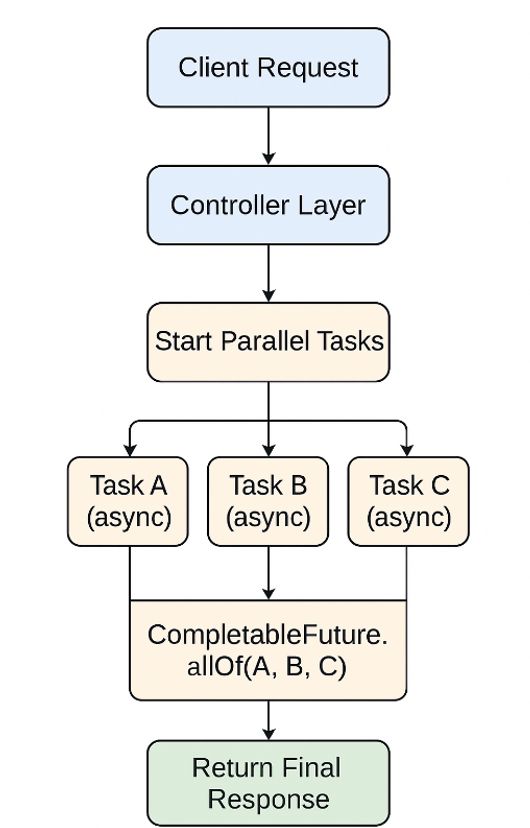
Architecture Diagram
How Multi-Threading Actually Works Internally
Let’s break this down in extremely simple terms.
Step 1: Spring Boot receives a request
A Tomcat thread (say Thread #27) picks it up.
Step 2: Tomcat thread delegates async tasks to ExecutorService
ExecutorService is a thread pool.
Think of it like
“Here are 5 workers (threads). They will do tasks for you.”
You submit tasks:
executor.submit(taskA)
executor.submit(taskB)
executor.submit(taskC)
Now 3 worker threads run tasks in parallel.
Tomcat thread is free to do other work.
Step 3: CompletableFuture wraps tasks to run async
CompletableFuture is like a promise
- You start a task
- It runs in background
- You get the result later
So,
CompletableFuture<String> orders = service.fetchOrders();
…means n “Start task orders now and return response immediately.”
Step 4: allOf() waits until all threads complete
This is a synchronization point
CompletableFuture.allOf(orders, payments, shipment).join();
This says n “Combine results only when ALL futures have completed.”
Step 5: Tomcat thread collects results and sends response
By the time Tomcat thread gathers results, tasks are already done.
Result →
- Faster APIs
- No blocking
- Better scalability
Difference Between Thread, ExecutorService & CompletableFuture (Very Clear)
| Concept | Meaning | Analogy |
|—-|—-|—-|
| Thread | Lowest unit of execution | One worker |
| ExecutorService | A pool of reusable threads | A team of workers |
| CompletableFuture | Async task handler, easy API | A promise that work will finish |
Why Not Create Threads Manually?
Because manual threads cause:
- Memory leaks
- Too many threads
- No lifecycle management
- No reuse
- No graceful shutdown
ExecutorService manages threads properly:
- Creates fixed number of threads
- Reuses them
- Avoids overhead
- Avoids thread explosion
CompletableFuture adds additional magic:
- Clean async composition
- Exception handling
- Chaining
- Combining tasks
- Running tasks sequentially or parallel
Together → powerful and clean async code.
Real Spring Boot Code
Step 1(a): Create Thread Pool Bean
@Configuration
public class AsyncConfig {

    @Bean
    public ExecutorService executorService() {
        return Executors.newFixedThreadPool(5);
    }
}
Meaning
- Create a pool of 5 threads.
- These threads are reused.
- No new threads created each time.
This is crucial for performance.
Step 1(b): Parallel Tasks Using CompletableFuture
return CompletableFuture.supplyAsync(() -> {
    sleep(3000);
    return "Result A";
}, executor);
Breakdown
- supplyAsync = run this function asynchronously
- lambda = the task
- executor = thread pool on which work runs
This ensures your tasks do not run on the main request thread.
Step 2: Service using CompletableFuture
@Service
public class AggregationService {

    private final ExecutorService executor;

    public AggregationService(ExecutorService executor) {
        this.executor = executor;
    }

    // Simulate a remote call or IO-bound work
    public CompletableFuture<String> fetchOrders() {
        return CompletableFuture.supplyAsync(() -> {
            sleep(300);
            return "OrdersLoaded";
        }, executor);
    }

    public CompletableFuture<String> fetchPayments() {
        return CompletableFuture.supplyAsync(() -> {
            sleep(250);
            return "PaymentsLoaded";
        }, executor);
    }

    public CompletableFuture<String> fetchShipment() {
        return CompletableFuture.supplyAsync(() -> {
            sleep(500);
            return "ShipmentLoaded";
        }, executor);
    }

    private void sleep(long ms) {
        try {
            TimeUnit.MILLISECONDS.sleep(ms);
        } catch (InterruptedException e) {
            Thread.currentThread().interrupt();
        }
    }
}
Step 3: Controller — Run all tasks in parallel
@RestController
@RequestMapping("/api")
public class AggregationController {

    private final AggregationService service;

    public AggregationController(AggregationService service) {
        this.service = service;
    }

    // Endpoint using CompletableFuture + custom ExecutorService
    @GetMapping("/aggregate")
    public String aggregate() {
        Instant start = Instant.now();

        CompletableFuture<String> orders = service.fetchOrders();
        CompletableFuture<String> payments = service.fetchPayments();
        CompletableFuture<String> shipment = service.fetchShipment();

        // Wait for all to complete
        CompletableFuture.allOf(orders, payments, shipment).join();

        String result = orders.join() + " | " + payments.join() + " | " + shipment.join();

        Instant end = Instant.now();
        long elapsedMs = Duration.between(start, end).toMillis();
        return String.format("result=%s; elapsedMs=%d", result, elapsedMs);
    }}
Meaning n “Wait until all async tasks finish.”
Then collect results
String result = orders.join() + " | " + payments.join() + " | " + shipment.join();
This is done only when all tasks complete.
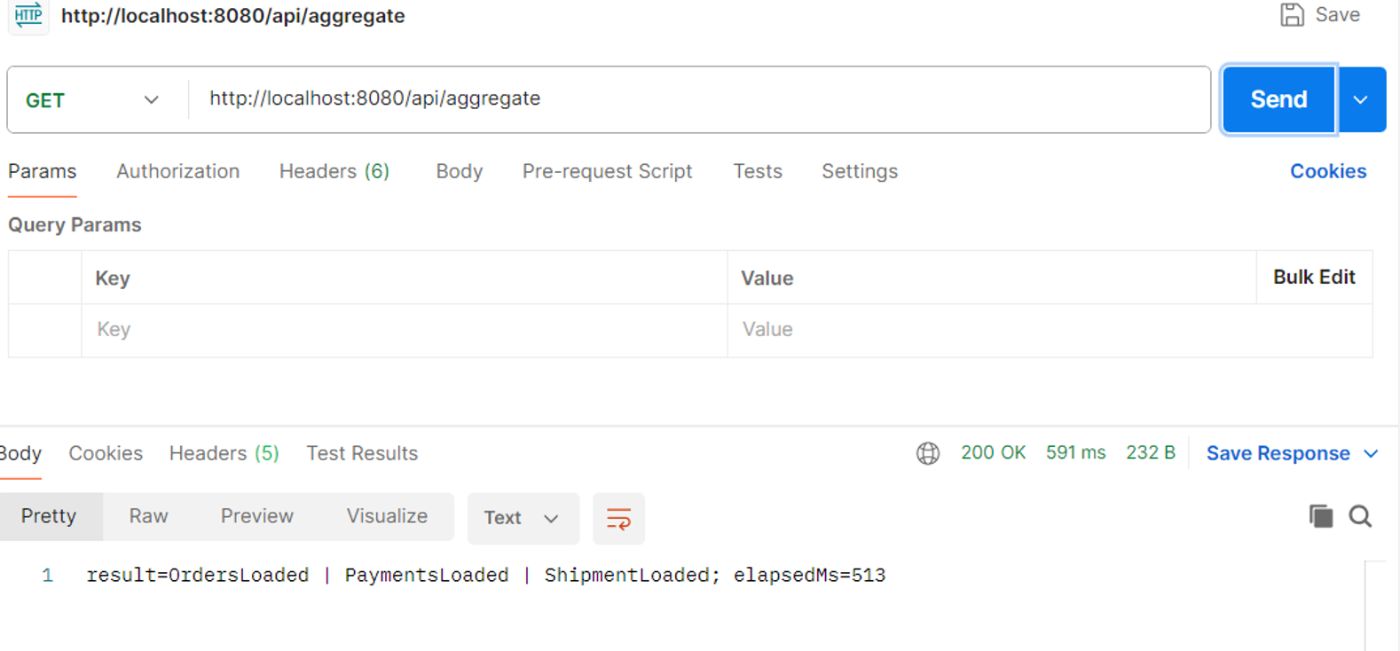
What Happens When You Call / Aggregate?
Orders = 3 sec n Payments = 2 sec n Shipment = 5 sec
All run simultaneously.
Total time = 5 seconds (longest task)
Without parallelism → 3 + 2 + 5 = 10 seconds n With parallelism → only 5 seconds
Output
Performance Comparison
| Scenario | Execution Time |
|—-|—-|
| Sequential Processing | 10 sec |
| Parallel Processing (3 tasks) | 4 sec |
| Parallel + non-blocking I/O | 2–3 sec |
This is a 60% to 80% performance boost.
Real-World Production Scenarios
Here are real use cases where multi-threading is used in enterprise applications:
Aggregating Microservice Results
User Profile API → 2 sec
Orders API → 3 sec
Payments API → 1 sec
Parallel makes response time 3 seconds instead of 6.
Data Engineering
Spark-like parallel job in Spring Boot:
- Parse 1000 files
- Process 20 file batches concurrently
- Write results to S3
ExecutorService is ideal here.
Large Report Generation
A PDF report may contain:
- Summary
- Graphs
- Tables
- Statistics
Each section can be calculated in parallel.
AI/ML Feature Generation
Extract:
- Feature set 1
- Feature set 2
- Feature set 3
These can run independently → perfect for threads.
Sending Multiple Notifications
Your system triggers:
- SMS
- Push notification
All can run asynchronously.
Thread Safety Considerations (Important for Interviews)
When using multi-threading
- Avoid shared mutable state
- Use thread-safe collections (ConcurrentHashMap)
- Avoid synchronized unless needed
- Stateless services are ideal
- Be careful with static variables
Spring beans are singletons, so ensure they don’t store per-request state.
Scaling Considerations
Thread pool size depends on workload:
For CPU-bound tasks
threads = number of CPU cores + 1
For IO-bound tasks
threads = 2 × cores or even higher
Danger – Too many threads
- high context switching
- OOM (OutOfMemoryError)
- slowdown
Always benchmark thread pool sizes.
Advantages of Using ExecutorService + CompletableFuture
Massive performance improvement → Parallelism reduces wasted time.
Non-blocking architecture → Allows server to handle more requests.
Clear async syntax → Very readable.
Built-in error handling → Computation doesn’t silently fail.
Thread pooling for efficient usage → No thread explosion.
Works with Microservice Aggregation pattern → Modern microservices use this everywhere.