Customer service teams face a persistent challenge. Existing chat-based assistants frustrate users with rigid responses, while direct large language model (LLM) implementations lack the structure needed for reliable business operations. When customers need help with order inquiries, cancellations, or status updates, traditional approaches either fail to understand natural language or can’t maintain context across multistep conversations.
This post explores how to build an intelligent conversational agent using Amazon Bedrock, LangGraph, and managed MLflow on Amazon SageMaker AI.
Solution overview
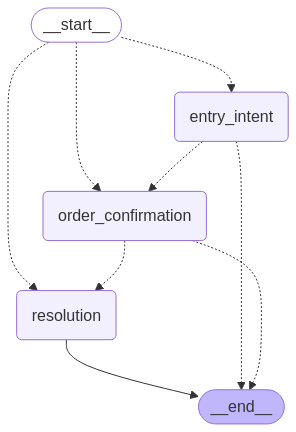
The conversational AI agent presented in this post demonstrates a practical implementation for handling customer order inquiries, a common but often challenging use case for existing customer service automation solutions. We implement an intelligent order management agent that addresses these challenges by helping customers find information about their orders and take actions such as cancellations through natural conversation. The system uses a graph-based conversation flow with three key stages:
- Entry intent – Identifies what the customer wants and collects necessary information
- Order confirmation –Presents found order details and verifies customer intentions
- Resolution – Executes the customer’s request and provides closure
This agentic flow is illustrated in the following graphic.
Problem statement
Most customer service automation solutions fall into two categories, each with significant limitations.
Rule-based chat assistant often fail at natural language understanding, leading to frustrating user experiences. They typically follow rigid decision trees that can’t handle the nuances of human conversation. When users deviate from expected inputs, these systems fail, forcing users to adapt to the assistant rather than the other way around. For example, a rule-based chat assistant might recognize “I want to cancel my order” but fail with “I need to return something I just bought” because it doesn’t match predefined patterns.
Meanwhile, modern LLMs excel at understanding natural language but present their own challenges when used directly. LLMs don’t inherently maintain state or follow multistep processes, making conversation management difficult. Connecting LLMs to backend systems requires careful orchestration, and monitoring their performance presents unique observability challenges. Most critically, LLMs may generate plausible but incorrect information when they lack access to domain knowledge.
To understand these limitations for a real-world example, consider a seemingly simple customer service scenario: a user needs to check on an order status or request a cancellation. This interaction requires understanding the user’s intent, extracting relevant information like order numbers and account details, verifying information against backend systems, confirming actions before execution, and maintaining context throughout the conversation. Without a structured approach, both rule-based systems and raw LLMs can’t handle these multistep processes that require memory, planning, and integration with external systems.
These fundamental limitations explain why existing approaches consistently fall short in real-world applications. Rule-based systems can’t effectively bridge natural conversation with structured business processes, while LLMs can’t maintain state across multiple interactions. Neither approach can seamlessly integrate with backend systems for data retrieval and updates, and both provide limited visibility into performance and user experience. Most critically, current solutions can’t balance the flexibility needed for natural conversation with the business rule enforcement required for reliable customer service.
This solution addresses these challenges through AI agents—systems that combine the natural language capabilities of LLMs with structured workflows, tool integration, and comprehensive observability.
Solution architecture
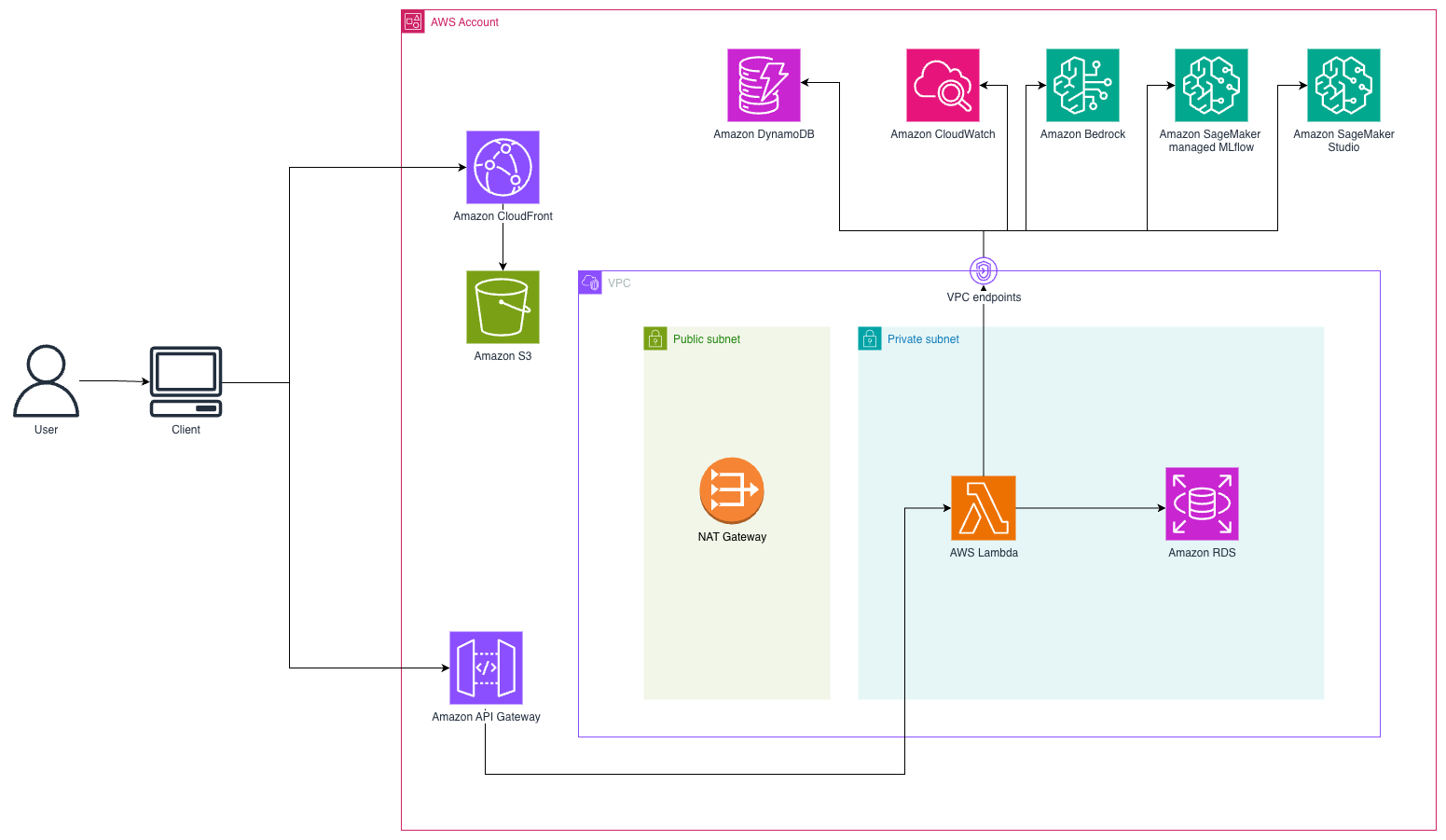
This solution implements a serverless conversational AI system using a WebSocket-based architecture for real-time customer interactions. Customers access a React frontend hosted on Amazon Simple Storage Service (Amazon S3) and delivered through Amazon CloudFront. When customers send messages, the system establishes a persistent WebSocket connection through Amazon API Gateway to AWS Lambda functions that orchestrate the conversation flow. The following diagram illustrates the solution architecture.
Agent architecture
This solution uses AI agents, systems where LLMs dynamically direct their own processes and tool usage while maintaining control over how they accomplish tasks. Unlike simple LLM applications, these agents maintain state and context across multiple interactions, can use external tools to gather information or perform actions, reason about their next steps based on previous outcomes, and operate with some degree of autonomy. The agent workflow follows a structured pattern of initialization, understanding user intent, planning required actions, executing tool calls when needed, generating responses, and updating conversation state for future interactions.
To build effective conversational agents, we need four core capabilities:
- Intelligence to understand and respond to users
- Memory to maintain context across conversations
- Ability to take actions in external systems
- Orchestration to manage complex multistep workflows
Our implementation addresses these requirements through specific Amazon Web Services (AWS) services and frameworks.
Amazon Bedrock serves as the intelligence layer, providing access to state-of-the-art foundation models (FMs) through a consistent API. Amazon Bedrock is used to handle intent recognition to understand what users are trying to accomplish, entity extraction to identify key information such as order numbers and customer details, natural language generation to create contextually appropriate responses, decision-making to determine the next best action in conversation flows, and coordination of tool use to interact with external systems. This intelligence layer enables our agent to understand natural language while maintaining the structured decision-making needed for reliable customer service.
State management (agent memory) is handled through Amazon DynamoDB, which provides persistent storage for conversation context even if there are interruptions or system restarts. The state includes session IDs as unique conversation identifiers, complete conversation history for context maintenance, formatted transcripts optimized for model context windows, extracted information such as order numbers and customer details, and process flags indicating confirmation status and information retrieval success. This persistent state allows our agent to maintain context across multiple interactions, addressing one of the key limitations of raw LLM implementations.
State management snippet code (for full implementation you can reference the code in backed/app.py):
The state includes a Time-To-Live (TTL) value that automatically expires conversations after a period of inactivity, helping to manage storage costs.
Function calling, also known as tool use, enables our agent to interact with external systems in a structured way. Instead of generating free-form text that attempts to describe an action, the model generates structured calls to predefined functions with specific parameters. You can think of this as giving the LLM a set of tools complete with instruction manuals, where the LLM decides when to use these tools and what information to provide. Our implementation defines specific tools that connect to an Amazon Relational Database (Amazon RDS) for PostgreSQL database: get_user for customer lookups, get_order_by_id for order details, get_customer_orders for listing customer orders, cancel_order for order cancellations, and update_order for order modifications.
The following code snippet allows proper handling of the message sequence between the assistant and user along with the right tool name and inputs or parameters required. (For implementation details, refer to backend/utils/utils.py):
The tools are defined with JSON schemas that provide clear contracts for the model to follow:
The previous snippet code shows only one example of tool definition, however in the implementation there are three different tools configured. For full details, refer to backend/tools_config/entry_intent_tool.py or backend/tools_config/agent_tool.py
This capability grounds the model to real-world data and systems, reduces hallucinations by providing factual information, extends the model’s capabilities beyond what it could do alone, and enforces consistent patterns for system interactions. The structured nature of function calling means that the model can only request specific data through well-defined interfaces rather than making assumptions.
LangGraph provides the orchestration framework for building stateful, multistep applications using a directed graph approach. It offers explicit tracking of conversation state, separation of concerns where each node handles a specific conversation phase, conditional routing for dynamic decision-making based on context, cycle detection to handle loops and repetitive patterns, and flexible architecture that’s straightforward to extend with new nodes or modify existing flows. You can think of LangGraph as creating a flowchart for your conversation, where each box represents a specific part of the conversation and the arrows show how to move between them.
The conversation flow is implemented as a directed graph using LangGraph. For reference, check the agentic flow graphic in the Solution architecture section.
The following code snippet shows the state graph that is a structure graph context used to collect information across different user interactions giving the agent the proper context:
This state object maintains the relevant information about the conversation, allowing the system to make informed decisions about routing and responses.
Our conversation flow uses three main nodes: the entry intent node handles initial user requests and extracts key information, the order confirmation node verifies details and confirms user intent, and the resolution node executes requested actions and provides closure. This approach offers explicit state management, conditional routing, separation of concerns, reusability across different conversation flows, and clear visualization of conversation paths:
The edges between nodes use conditional logic to determine the flow on a runtime execution as shown in the following code snippet based on the content of the StateGraph:
Each node in the conversation graph is implemented as a Python function that processes the current state and returns an updated state. The entry intent node handles initial user requests, extracts key information such as order numbers, and determines next steps by interpreting customer queries. It uses tools to search for relevant order information, extract key details such as order numbers or customer identifiers, and determines if enough information is available to proceed. The order confirmation node verifies details and confirms user intent by presenting found order details to the customer, verifying this is the correct order being discussed, and confirming the customer’s intentions regarding the order. The resolution node executes requested actions and provides closure by executing necessary actions such as providing status or canceling orders, confirming successful completion of requested actions, answering follow-up questions about the order, and providing a natural conclusion to the conversation:
For full implementation details, refer to: backend/nodes.
The nodes use a consistent pattern of extracting relevant information from the state, processing the user message using the LLM, executing the necessary tools, updating the state with new information, and determining the next node in the flow.
Observability becomes essential because LLM applications present unique challenges including nondeterministic outputs where the same input can produce different results, complex chains where multiple models and tools interact in sequence, performance monitoring where latency affects user experience, and quality assessment that requires specialized metrics. Managed MLflow on Amazon SageMaker AI addresses these challenges through specialized tracing capabilities that monitor model interactions, latency, token usage, and conversation paths.
Each conversation node is decorated with MLflow tracing:
This straightforward decorator automatically captures rich information about each node’s execution. It records model invocations, showing which models were called and with what parameters. It tracks response metrics such as latency, token usage, and completion reasons. It maps conversation paths, showing how users navigate through the conversation graph. It also logs tool usage, indicating which tools were called and their results, as well as error patterns identifying when and why failures occur.
The captured data is visualized in the MLflow UI, providing insights for production performance monitoring, optimization opportunities, debugging, and business impact measurement.
MLflow traces capture the whole agentic workflow execution including the nodes involved in the interaction, the inputs and outputs per node, and additional metadata such as the latency, the tool calls, and the conversation sequence.
The following screenshot shows an example of MLFlow tracking server traces capturing the agentic workflow execution, including nodes involved, inputs and outputs per node, and metadata such a latency, tool calls, and conversation sequence.
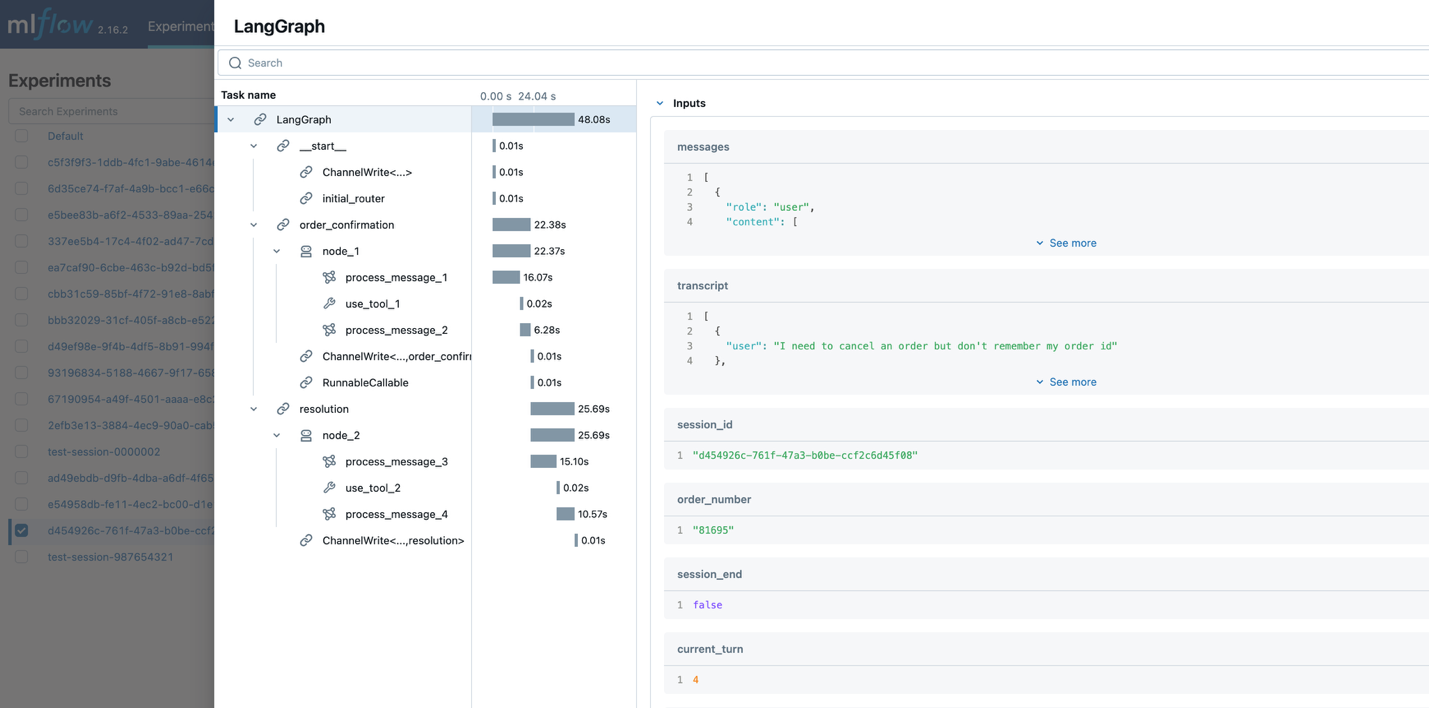
This traceability is critical for continuous improvement of the agent. Developers can identify patterns in successful conversations and opportunities for optimization.
Prerequisites
To build a serverless conversational AI agent using Claude with LangGraph and managed MLflow on Amazon SageMaker AI, you need the following prerequisites:
AWS account requirements:
- An AWS account with permissions to create Lambda functions, DynamoDB tables, API gateways, S3 buckets, CloudFront distributions, Amazon RDS for PostgreSQL instances, and Amazon Virtual Private Cloud (Amazon VPC) resources
- Amazon Bedrock access with Claude 3.5 Sonnet by Anthropic enabled
Development environment:
- The AWS Command Line Interface (AWS CLI) is installed on your local machine
- Git and Docker utilities are installed on your local machine
- Permission to create AWS resources
- Python 3.12 or later
- Node.js 20+ and npm installed
- AWS Cloud Development Kit (AWS CDK) CLI installed (
`npm install -g aws-cdk`) - Amazon CloudWatch Logs role Amazon Resource Name (ARN) configured in API Gateway account settings (required for API Gateway logging):
- Create an AWS Identity and Access Management (IAM) role with required permissions. For guidance, refer to Permissions for CloudWatch logging.
- Configure the role in the API Gateway console. Follow steps 1–3 only.
Skills and knowledge:
- Familiarity with serverless architectures
- Basic knowledge of Python and React
- Understanding of AWS services (AWS Lambda, Amazon DynamoDB, Amazon VPC)
Deployment guide
To build a serverless conversational AI agent using Claude with LangGraph and managed MLflow on Amazon SageMaker AI, follow these steps:
- Clone the repository and set up the project root:
- Bootstrap your AWS environment (required if the bootstrap wasn’t done before):
- Install dependencies:
- Build and deploy application:
This script will:
- Deploy the backend infrastructure, including the VPC, Lambda function, database, and MLflow
- Get the Lambda ARN from the backend stack
- Deploy the frontend with integrated WebSocket API Gateway
- Get the actual WebSocket API URL from the deployed stack
- Create and upload
config.jsonwith runtime configuration to Amazon S3
Clean up
To avoid ongoing charges from the resources created in this post, clean up the resources when they’re no longer needed. Use the following command:
Conclusion
In this post, we showed how combining the reasoning capabilities of LLMs from Amazon Bedrock, orchestration capabilities of LangGraph, and observability of managed MLflow on Amazon SageMaker AI can be used to build customer service agents. The architecture enables natural, multiturn conversations while maintaining context across interactions, seamlessly integrating with backend systems to perform real-world actions such as order lookups and cancellations.
The comprehensive observability is provided by MLflow so developers can monitor conversation flows, track model performance, and optimize the system based on real usage patterns. By using AWS serverless services, this solution automatically scales to handle varying workloads while maintaining cost efficiency through pay-per-use pricing. You can use this blueprint to build sophisticated conversational AI solutions that bridge the gap between natural language interaction and structured business processes, delivering business value through improved customer experiences and operational efficiency.
Ready to take your conversational AI agent further? Get started with Amazon Bedrock AgentCore to accelerate your agents to production with intelligent memory and a gateway to enable secure, controlled access to tools and data. Discover how MLflow integrates with Bedrock AgentCore Runtime for comprehensive observability across your agent ecosystem.