Table of Links
-
Prior Work and 2.1 Educational Objectives of Learning Activities
-
3.1 Multiscale Design Environment
3.2 Integrating a Design Analytics Dashboard with the Multiscale Design Environment
-
5.1 Gaining Insights and Informing Pedagogical Action
5.2 Support for Exploration, Understanding, and Validation of Analytics
5.3 Using Analytics for Assessment and Feedback
5.4 Analytics as a Potential Source of Self-Reflection for Students
-
Discussion + Implications: Contextualizing: Analytics to Support Design Education
6.1 Indexicality: Demonstrating Design Analytics by Linking to Instances
6.2 Supporting Assessment and Feedback in Design Courses through Multiscale Design Analytics
3.2 Integrating a Design Analytics Dashboard with the Multiscale Design Environment
In order to connect design assessment with design work, we integrated multiscale design analytics into the multiscale design environment. To contextualize the analytics, we link them with design work instances. The multiscale design analytics that we present to instructors are (1) the number of scales and (2) the number of clusters present within a given design work instance. Our linkage of design analytics to design instances makes visible to users what is being measured by analytics.
We choose an off-the-shelf AI model suitable for computing multiscale design analytics. As we described in the introduction, our goal is to explore the potential of AI-based multiscale design analytics for supporting design instructors, not to compare or refute particular techniques. We invoke Jain et al.’s [40] spatial clustering based model, as it has been previously used in design education contexts, for recognizing clusters of elements nested across scales within multiscale design work. We input position, width, height, and transforms of multiscale design elements—extracting them from the JSON representation—and obtain scales and clusters as output from the model.
We integrate a design analytics dashboard directly with the multiscale design environment in which students perform their work. As instructors regularly use the environment to view and assess student projects, the dashboard integration streamlines the process of making AI-based analytics available in their situated work contexts. The dashboard interface allows instructors to manage a course, its assignments, and submission to the assignments. When an instructor views
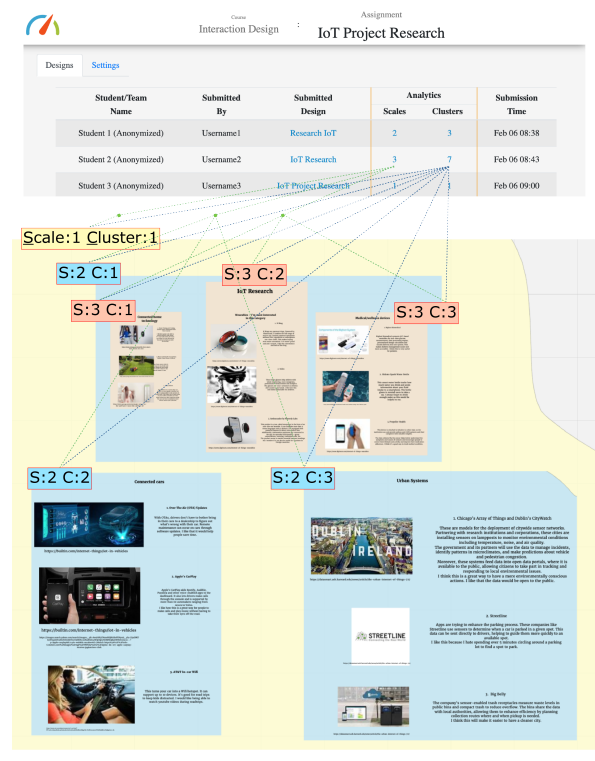
an assignment page (see Figure 3 top) on the dashboard, it presents to them the students’ submissions and scale and cluster analytics derived through the AI analysis of submissions.
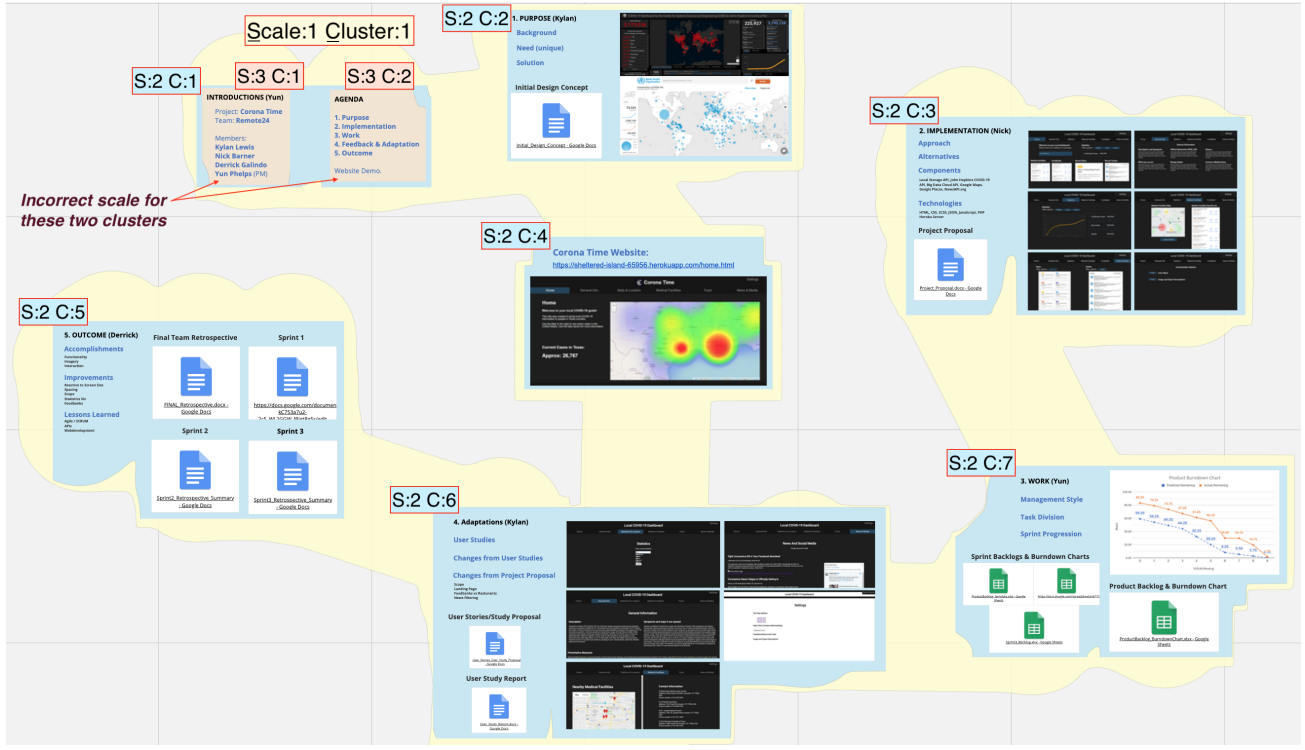
We link the dashboard presentation of the analytics with the specific design assemblages they measure. This makes results of AI recognition—for each instance of student design work—visible to the instructor (see Figure 3 bottom). When the instructor clicks a scale or cluster analytic, it opens the corresponding student design work instance within the multiscale design environment. An animation shows them the design assemblages for each scale and cluster. All clusters at the same scale are presented using the same background color, so as to help discern nested relationships (Figure 3 bottom, Figure 4).
:::info
Authors:
(1) Ajit Jain, Texas A&M University, USA; Current affiliation: Audigent;
(2) Andruid Kerne, Texas A&M University, USA; Current affiliation: University of Illinois Chicago;
(3) Nic Lupfer, Texas A&M University, USA; Current affiliation: Mapware;
(4) Gabriel Britain, Texas A&M University, USA; Current affiliation: Microsoft;
(5) Aaron Perrine, Texas A&M University, USA;
(6) Yoonsuck Choe, Texas A&M University, USA;
(7) John Keyser, Texas A&M University, USA;
(8) Ruihong Huang, Texas A&M University, USA;
(9) Jinsil Seo, Texas A&M University, USA;
(10) Annie Sungkajun, Illinois State University, USA;
(11) Robert Lightfoot, Texas A&M University, USA;
(12) Timothy McGuire, Texas A&M University, USA.
:::
:::info
This paper is available on arxiv under CC by 4.0 Deed (Attribution 4.0 International) license.
:::