Managing AI model access across dozens or hundreds of AWS accounts creates a dilemma. Either you grant AWS Marketplace permissions broadly, risking governance issues, or you manually enable subscriptions in each account. For organizations using third-party models like Anthropic Claude or Cohere, this operational overhead slows AI adoption.
In this post, we show you how to use managed entitlements for Amazon Bedrock to subscribe once from a central account and distribute model access across your organization. This approach removes the need for AWS Marketplace permissions in workload accounts. Managed entitlements complement other Amazon Bedrock capabilities like model evaluation and guardrails by making sure your teams can access the models they need while maintaining centralized governance.
In this post, we explain when managed entitlements are the right solution for your organization, walk through the four-step workflow, demonstrate real-world scenarios, and cover important considerations for private offers and regional behavior.
Understanding how different models are distributed is key to knowing when you need managed entitlements. The following table shows three categories:
| Model category | Examples | Access method |
| Amazon models | Amazon Nova | Available immediately with Amazon Bedrock permissions |
| Amazon sold models | Meta, Mistral, DeepSeek | Available immediately with Amazon Bedrock permissions |
| AWS Marketplace models | Anthropic Claude, Cohere, Stability AI | Require AWS Marketplace subscription |
For both Amazon models and those sold by Amazon, recently introduced simplified access means you can start invoking them immediately with no additional setup required. Third-party models distributed through AWS Marketplace work differently. Each account needs a subscription before invoking these models, which means each account needs AWS Marketplace permissions. For organizations managing many accounts, this creates operational overhead. Either you grant AWS Marketplace permissions broadly, or you have someone manually enable models in each account.
Managed entitlements for Amazon Bedrock closes this gap. Subscribe once from a central account, then distribute access across your organization using AWS License Manager. No AWS Marketplace permissions are needed in member accounts.
When do you need managed entitlements?
Managed entitlements are designed for organizations that run workloads across multiple AWS accounts, want to avoid granting AWS Marketplace permissions to workload accounts, have negotiated private offer pricing and want consistent rates across accounts, or need centralized visibility into model access across their organization. It applies only when using third-party AWS Marketplace models such as Anthropic Claude, AI21 Labs, Cohere, and Stability AI.
You might not need managed entitlements if you only use Amazon and partner models (such as Amazon Titan, Llama, Mistral, or DeepSeek), operate in a single AWS account, or each account team already manages their own AWS Marketplace subscriptions independently.
Prerequisites
Before implementing managed entitlements, verify you have the following in place:
- AWS Organizations with all features enabled: Managed entitlements requires AWS Organizations configured with all features enabled.
- Management account access: You need access to your management account with permissions for both AWS Marketplace and AWS License Manager.
- Member accounts: The accounts where you want to distribute model access.
- Service-linked roles (SLRs): Predefined AWS Identity and Access Management (IAM) roles that are linked directly to AWS services. For Managed Entitlements, you must create SLRs for both AWS License Manager and AWS Marketplace. These roles include all permissions that the services require to call other AWS services on your behalf.
How it works
Think of a license as your organization’s entitlement to use a model, and grants as the mechanism to share that entitlement with specific accounts. One license can have multiple grants, so you can distribute access to many accounts from a single subscription.
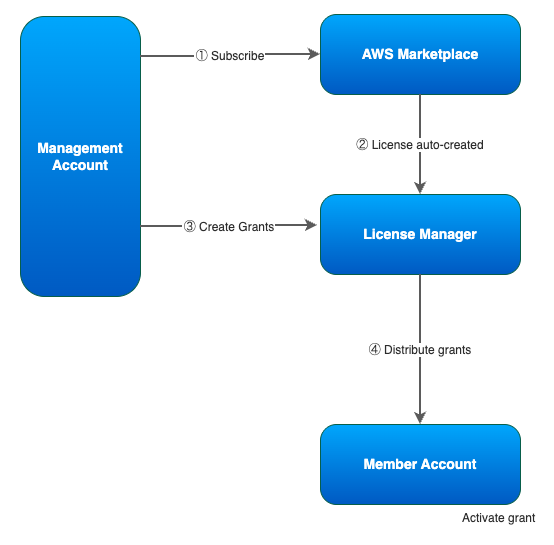
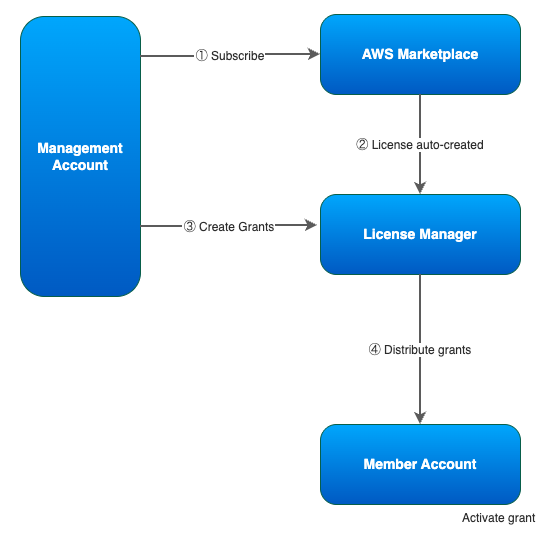
The managed entitlements workflow consists of four main steps, as shown in the following diagram:
To implement managed entitlements:
- Subscribe to a model: From your management account, you subscribe to a third-party Amazon Bedrock model through AWS Marketplace. This happens when you subscribe to the model through AWS Marketplace. You can subscribe through the AWS Marketplace console or by accepting a private offer. After you subscribe, AWS License Manager automatically creates a license.
- Verify license creation: AWS License Manager automatically creates a license for your subscription. This license represents your entitlement to use the model and serves as the basis for distribution to other accounts.
- Create grants: Using AWS License Manager, you create grants to share the license with specific member accounts in your AWS Organizations. You control exactly which accounts receive access to each model.
- Activate and use: Member accounts receive notification of their grants. After they activate the grant, they can immediately begin invoking the model. No AWS Marketplace permissions or additional subscriptions are needed.
A member account can still invoke a model without subscribing to a private offer or an activated grant but they will be billed at public pricing.
Real-world scenarios
Scenario 1: Enabling a model across your organization
Situation: Your teams need access to a new Anthropic Claude model across 50 workload accounts. You don’t want to grant aws-marketplace:Subscribe permissions to each account, and you don’t want to manually enable models one account at a time.
Solution: From your management account (which has AWS Marketplace permissions), subscribe to the AWS Marketplace private offer. AWS License Manager automatically creates a license. Create grants for your 50 workload accounts and distribute them to individual accounts, an organization, or an organizational unit (OU). Each account can activate their grant individually, or grants can be activated at the organization level. Then teams can invoke the model without AWS Marketplace permissions in their accounts.
Result: Central subscription, distributed access, no AWS Marketplace permissions in workload accounts.
Scenario 2: Phased model rollout
Situation: You want to pilot a new model with select teams before organization-wide availability. You need visibility into who’s using what and the ability to expand access incrementally.
Solution: Subscribe from your management account, then create grants only for pilot accounts. As the pilot succeeds, extend grants to additional accounts. AWS License Manager provides visibility into grant status across your organization.
Result: Controlled rollout with a clear audit trail of which accounts have access and when they activated it.
Scenario 3: Private offer distribution
Situation: You’ve negotiated custom pricing with a model provider through AWS Marketplace. You need each account to use this pricing rather than create their own subscriptions.
Solution: Ask the provider to extend the private offer to the management account. Accept the private offer from your management account. The license created reflects your negotiated terms. Distribute access via grants to verify that usage across member accounts flows through your agreement.
Result: Consistent pricing across your organization with simplified cost allocation.
Scenario 4: Rapid org-wide deployment
Situation: Your organization has standardized on a model for AI workloads. You want every account in your AWS Organizations to have access immediately.
Solution: Subscribe from your management account, then distribute to your entire organization in one step by distributing the grant to the entire AWS Organizations (rather than select accounts) as a target.
That’s it. Member accounts automatically receive the grant. For organizations with all features enabled, the organization automatically accepts grants, but they appear in a Disabled state until the account administrator explicitly activates them. This provides a final control point before model usage begins.
Result: Every account in your organization gets model access with a single grant. New accounts added to the organization automatically inherit access with no additional grant creation needed.
Considerations
Before implementing managed entitlements, keep the following in mind to make sure your deployment goes smoothly.
Cost allocation
Model usage costs are billed to the management account that holds the subscription. Use AWS Cost Allocation Tags to track usage by member account or team.
Private offers
When working with private offers negotiated through AWS Marketplace, the managed entitlements workflow remains the same. Accept the private offer from your management account, and the license is created automatically. You can then distribute access to member accounts through grants.
Private offers often include custom pricing, payment terms, or additional support agreements. These terms apply to your organization’s usage of the model, regardless of which member accounts invoke it. Review the offer terms carefully before accepting and distributing access.
Existing subscriptions
When member accounts have active Amazon Bedrock models and their payer account distributes them a subscription to the same model, the entitlements to the first subscription is disabled and they now have entitlements on the new distributed grant.
Regional behavior
While you can invoke models in supported AWS Regions, AWS License Manager creates licenses in us-east-1. Grant creation and activation also occur through the us-east-1 endpoint for AWS License Manager, even if your workloads run in other Regions.
Clean up resources
If you no longer need a model subscription:
- Delete grants from member accounts in AWS License Manager.
- Cancel the AWS Marketplace subscription from your management account.
- Verify that member accounts are no longer billed at private rates.
Note: Canceling a subscription doesn’t automatically remove grants. You must delete grants separately to revoke private pricing.
Conclusion
In this post, we showed you how to use managed entitlements for Amazon Bedrock to centralize third-party model subscriptions and distribute access across your organization without granting AWS Marketplace permissions to workload accounts.
Managed entitlements for Amazon Bedrock represent a significant improvement in how organizations manage third-party model access at scale. Your existing subscriptions continue to function without disruption, and you can immediately begin using the centralized distribution workflow for new subscriptions while maintaining your organization’s governance controls.
By centralizing subscription management and avoiding the need for per-account AWS Marketplace permissions, you can focus on building AI applications rather than managing access infrastructure.
Next steps
Ready to implement managed entitlements? Start by:
- Identifying which third-party models your organization uses.
- Reviewing your current subscription approach across accounts.
- Implementing managed entitlements for one model as a pilot.
- Expanding to additional models and accounts based on your results.
You can also explore combining managed entitlements with AWS Service Catalog to create self-service model access workflows for your teams.
If you have questions or want to share how you’re managing model access across your AWS accounts, leave a comment.
Resources
- Managed entitlements in Amazon Bedrock.
- Amazon Bedrock model access.
- Simplified Amazon Bedrock model access (AWS Security Blog).