Modern analytics systems rely on tracking how business entities change over time. Whether you manage customer profiles, product catalogs, employee data, or subscription plans — dimensions evolve, and your data engineering pipelines must preserve history correctly. If your data platform overwrites old values blindly, you lose history—and downstream analytics such as compliance reports, churn analysis, and ML training suffer dramatically.
This is where Slowly Changing Dimensions (SCDs) become essential.
Apache Spark and Databricks enable scalable and fully automated SCD handling for billions of records.
What is an SCD?
A Slowly Changing Dimension stores master data that changes infrequently, such as:
- Customer Name, City, Phone
- Product Category, Brand
- Employee Designation
- Store Location
The challenge: n Some attributes need overwriting, some need history, and some require partial history.
Real–World Business Story (Used Throughout This Blog)
A company maintains a Customer Dimension with these columns
| Column | Meaning |
|:—:|:—:|
| customerid | Natural key |
| name | Customer full name |
| city | Location |
| segment | Gold/Silver/Bronze |
| validfrom | Effective start date |
| validto | Effective end date |
| iscurrent | Whether row is active |
We will track this customer
| customer_id | name | city | segment |
|:—:|:—:|:—:|:—:|
| 101 | John Deo | Mumbai | Gold |
Now imagine your customer updates flowing in every hour, city changes, segment upgrades, name corrections. This is exactly the kind of real-world churn SCDs are designed to handle.
And then changes occur over months:
- City changes → “John moves to Delhi”
- Segment changes → “John becomes Platinum”
- Name correction → “Jhon Deo corrected to John Deo”
We will see how each SCD Type handles these changes.
Here’s where most engineers get tripped up: understanding SCDs is simple, but implementing them efficiently in Spark is a whole different challenge.
SCD in Spark — Challenges
Here’s the catch: Spark is distributed, stateless, and doesn’t update records the way traditional ETL tools do.
Unlike traditional ETL tools (Informatica, SSIS), Spark is:
- distributed
- stateless
- append-optimized
- built for batch + streaming
This means you must manage:
- record comparison
- surrogate keys
- versioning
- window logic
- updates + inserts
Modern platforms like Delta Lake make SCDs extremely efficient.
SCD Type-0 (Passive) — “Do Nothing”
Definition
Do not update anything. n Incoming changes are ignored.
Never change the value. n Used for immutable fields (DOB, SSN).
Business Use Case
- Regulatory historical tables
- Immutable ledger
- “Snapshot at signup time” attributes
Example
Incoming change:
| customer_id | name | city | segment |
|:—:|:—:|:—:|:—:|
| 101 | John Deo | Delhi | Gold |
Output (No change)
| customer_id | name | city | segment |
|:—:|:—:|:—:|:—:|
| 101 | John Deo | Mumbai | Gold |
PySpark Code
# Type 0 → Do nothing
final_df = dim_df
SCD Type-1 — Overwrite (No History)
Definition
Latest value overwrites existing record History is NOT preserved. Update the dimension record in place. n No history.
SCD Type-1 means overwrite old values. No history is kept.
Used when:
- Only latest value matters
- No need to track previous versions
Examples
- Customer phone number
- Address
- Product description
- Email ID
Use Case
- Fix spelling mistakes
- Non-critical fields (email, phone)
- Data quality corrections
Example
Incoming change: John moves from Mumbai → Delhi
Before
| customer_id | name | city |
|:—:|:—:|:—:|
| 101 | John Deo | Mumbai |
After (Type-1)
| customer_id | name | city |
|:—:|:—:|:—:|
| 101 | John Deo | Mumbai |
PySpark Code
final_df = dim_df.alias("d")
    .join(stg_df.alias("s"), "customer_id", "left")
    .select(
        "customer_id",
        F.coalesce("s.name", "d.name").alias("name"),
        F.coalesce("s.city", "d.city").alias("city")
    )
SCD Type-2 — Full History (Historical Tracking)
Definition
Create a new row when an attribute changes. n Mark the previous row as expired.
Columns Used
- valid_from
- valid_to
- is_current
Use Case
- Customer moves to new city
- Salary change
- Product price change
- Store relocation
Example — John moves from Mumbai → Delhi
Stage incoming change
| customer_id | name | city |
|:—:|:—:|:—:|
| 101 | John Deo | Delhi |
Current Dimension
| custid | city | validfrom | validto | iscurrent |
|:—:|:—:|:—:|:—:|:—:|
| 101 | Mumbai | 2024-01-01 | 9999-12-31 | 1 |
Type-2 Output
| custid | city | validfrom | validto | iscurrent |
|:—:|:—:|:—:|:—:|:—:|
| 101 | Mumbai | 2024-01-01 | 2024-03-10 | 0 |
| 101 | Delhi | 2024-03-10 | 9999-12-31 | 1 |
SAMPLE_TYPE-2
from pyspark.sql import SparkSession, functions as F
from pyspark.sql.types import IntegerType
curr = spark.read.option("header",True).csv("/FileStore/test/customers_current.csv")
upd = spark.read.option("header",True).csv("/FileStore/test/customers_updates.csv")
print("=== CURRENT DIMENSION (before) ===")
curr.show(truncate=False)
print("=== INCOMING UPDATES ===")
upd.show(truncate=False)
# Convert schemas
curr2 = curr.select(
    F.col("customer_id").cast(IntegerType()).alias("customer_id"),
    F.col("name"),
    F.col("city"),
    F.col("segment"),
    F.to_date(F.col("valid_from"), "M/d/yyyy").alias("valid_from"),
    F.to_date(F.col("valid_to"), "M/d/yyyy").alias("valid_to"),
    F.col("is_current")
)
upd2 = upd.select(
    F.col("customer_id").cast(IntegerType()).alias("customer_id"),
    F.col("name"),
    F.col("city"),
    F.col("segment"),
    F.to_date(F.col("updated_at"), "M/d/yyyy").alias("updated_at")
)
# For demo, compute expired + new rows
today = F.current_date()
curr_active = curr2.filter(F.col("is_current")== "1")
expired = curr_active.alias("c").join(upd2.alias("u"), "customer_id", "inner")
    .select("c.customer_id","c.name","c.city","c.segment",F.col("c.valid_from"),today.alias("valid_to"),F.lit("0").alias("is_current"))
print("=== EXPIRED ROWS ===")
expired.show(truncate=False)
new_rows = upd2.select(
    F.col("customer_id"),
    F.col("name"),
    F.col("city"),
    F.col("segment"),
    today.alias("valid_from"),
    F.lit("9999-12-31").alias("valid_to"),
    F.lit("1").alias("is_current")
)
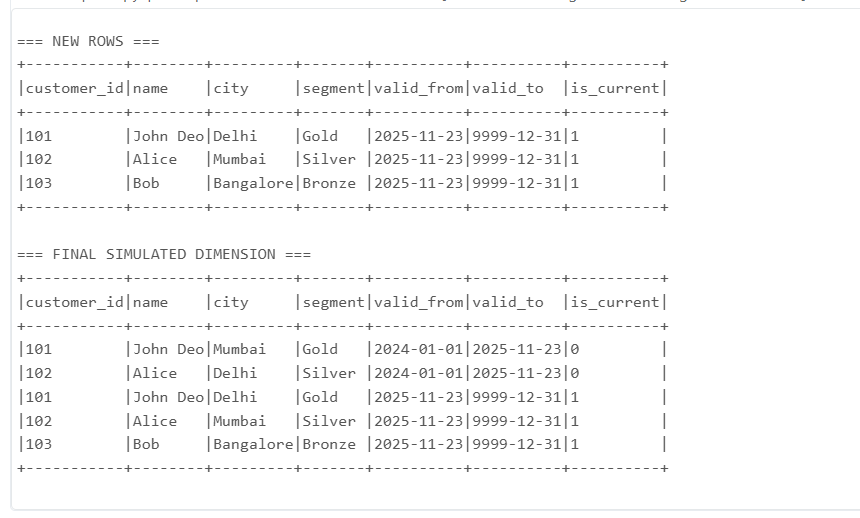
print("=== NEW ROWS ===")
new_rows.show(truncate=False)
final = curr2.filter(F.col("is_current") != "1").unionByName(expired).unionByName(new_rows)
print("=== FINAL SIMULATED DIMENSION ===")
final.show(truncate=False)
**OUTPUT
PySpark (Delta Lake Merge
from delta.tables import DeltaTable
from pyspark.sql import functions as F
delta_dim = DeltaTable.forPath(spark, "/mnt/dim_customer")
# Close old rows
delta_dim.alias("t").merge(
stg_df.alias("s"),
"t.customer_id = s.customer_id AND t.is_current = 1 AND (t.city <> s.city OR t.segment <> s.segment)"
).whenMatchedUpdate(set={
"valid_to": F.current_date(),
"is_current": "0"
}).execute()
# Insert new rows
delta_dim.alias("t").merge(
stg_df.alias("s"),
"t.customer_id = s.customer_id AND t.is_current = 1 AND (t.city <> s.city OR t.segment <> s.segment)"
).whenNotMatchedInsert(values={
"customer_id": "s.customer_id",
"name": "s.name",
"city": "s.city",
"segment": "s.segment",
"valid_from": F.current_date(),
"valid_to": F.lit("9999-12-31"),
"is_current": "1"
}).execute()
SCD Type-3 — Store Previous Value (Limited History)
Definition
Keep current and previous values only.
Use Case
- Keep previous and current city
- Track last job role change
- Last two subscription plans
Example
Incoming change: Mumbai → Delhi
PySpark Code
final_df = dim_df.join(stg_df, "customer_id")
    .select(
        "customer_id",
        stg_df.city.alias("city_current"),
        dim_df.city.alias("city_previous")
    )
Output
| customerid | citycurrent | city_previous |
|:—:|:—:|:—:|
| 101 | Delhi | Mumbai |
SCD Type-4 — History Table + Current Table
Definition
Two tables:
- Dimension Current Table
- History Table
Use Case
- Customer moves frequently
- Need long-term history
- Fact tables reference only current dimension
Example Structure
dimcustomercurrent
| customer_id | name | city |
|:—:|:—:|:—:|
| 101 | John Deo | Delhi |
dimcustomerhistory
| customerid | name | city | changedat |
|:—:|:—:|:—:|:—:|
| 101 | John Deo | Mumbai | 2024-03-10 |
PySpark Code
history_df = dim_current.join(stg_df, "customer_id")
    .filter(dim_current.city != stg_df.city)
    .select(dim_current["*"], F.current_timestamp().alias("changed_at"))
dim_current = stg_df
SCD Type-6 — Hybrid (1 + 2 + 3)
Definition
Combination of:
- Type-1 (overwrite current)
- Type-2 (full history)
- Type-3 (store previous value)
Most commonly used in banking, telecom, and e-commerce.
Example
Customer moves Mumbai → Delhi
Output
| id | city | cityprev | validfrom | validto | iscurrent |
|:—:|:—:|:—:|:—:|:—:|:—:|
| 101 | Mumbai | NULL | 2024-01-01 | 2024-03-10 | 0 |
| 101 | Delhi | Mumbai | 2024-03-10 | 9999-12-31 | 1 |
PySpark Merge
delta_dim.alias("t").merge(
stg.alias("s"),
"t.customer_id = s.customer_id AND t.is_current = 1"
).whenMatchedUpdate(
condition="t.city <> s.city",
set={
"valid_to": F.current_date(),
"is_current": "0"
}
).whenNotMatchedInsert(values={
"customer_id": "s.customer_id",
"city": "s.city",
"city_prev": "t.city",
"valid_from": F.current_date(),
"valid_to": F.lit("9999-12-31"),
"is_current": "1"}).execute()
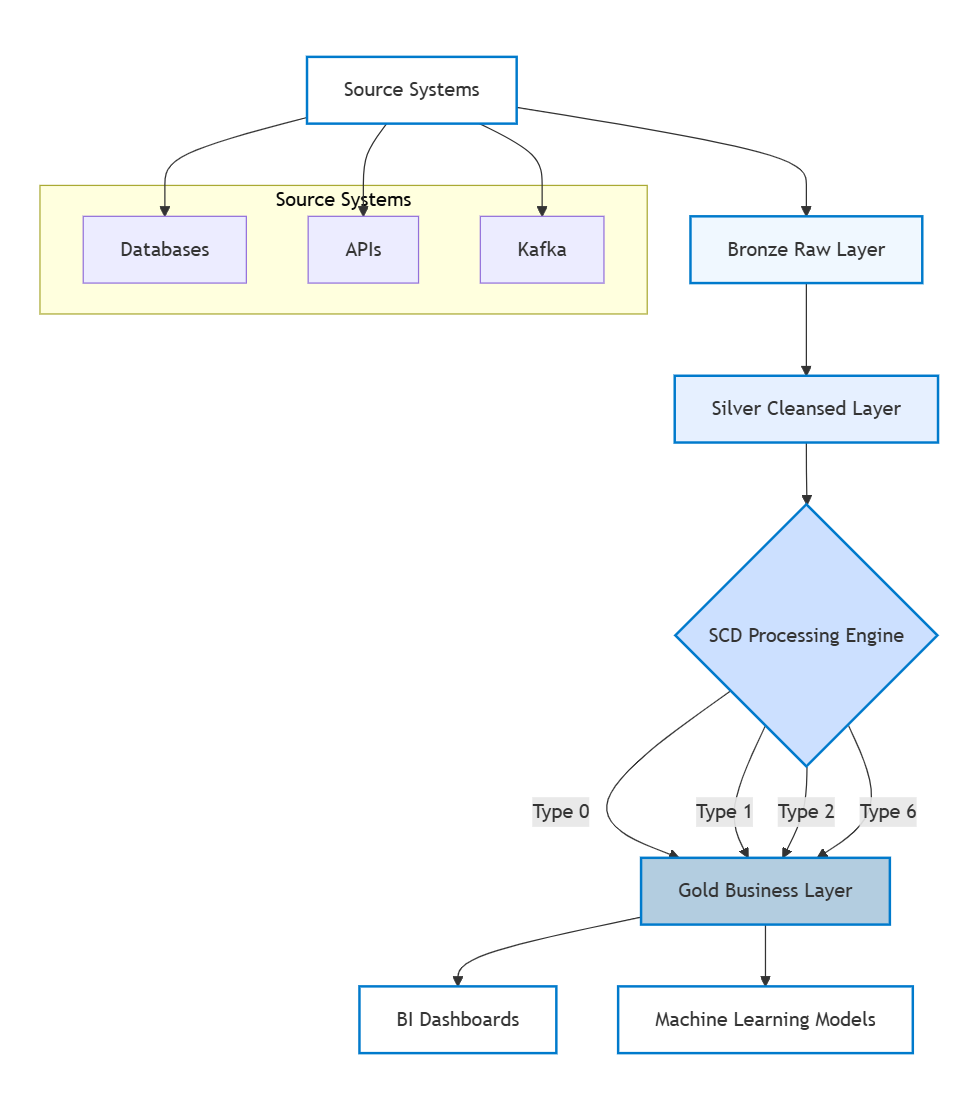
**Databricks Production Architecture
n
n
Final Summary Table (All SCD Types)
| Type | Description | History? | Use Case |
|:—:|:—:|:—:|:—:|
| 0 | No changes | NO | Immutable values |
| 1 | Overwrite | NO | Fixes, emails, metadata |
| 2 | Full history | YES | Customer moves, salary change |
| 3 | Limited history | Partial | Only previous value needed |
| 4 | History table | Full | Maintain separate history |
| 6 | Hybrid | Full+Prev | Telecom, Banking, E-commerce |