Introduction — Why Cache Matters
In modern microservice architectures, performance and scalability are not optional — they are the foundation. When APIs serve hundreds of requests per second, even milliseconds add up. Every database call, if repeated, can drain response time and system resources. That’s where caching comes in.
Caching means temporarily storing frequently accessed data in memory so that future requests can be served much faster without hitting the database.
Among various caching solutions, Redis stands out as:
- Blazingly fast (in-memory store)
- Easy to integrate
- Open source and lightweight
- Supports advanced data structures and pub/sub models
Here, we’ll build a real-world API using Spring Boot 3.2 and integrate Redis caching to achieve high performance with minimal code.
Real-World Use Case
Imagine you’re building a Service for an e-commerce platform.
- The API fetches product details from the database.
- Users often view the same products multiple times.
- Without caching, every request hits the DB.
- With caching, once a product is fetched, it’s stored in Redis — subsequent calls are served instantly.
This approach reduces:
- Database load
- API latency
- Cloud compute cost
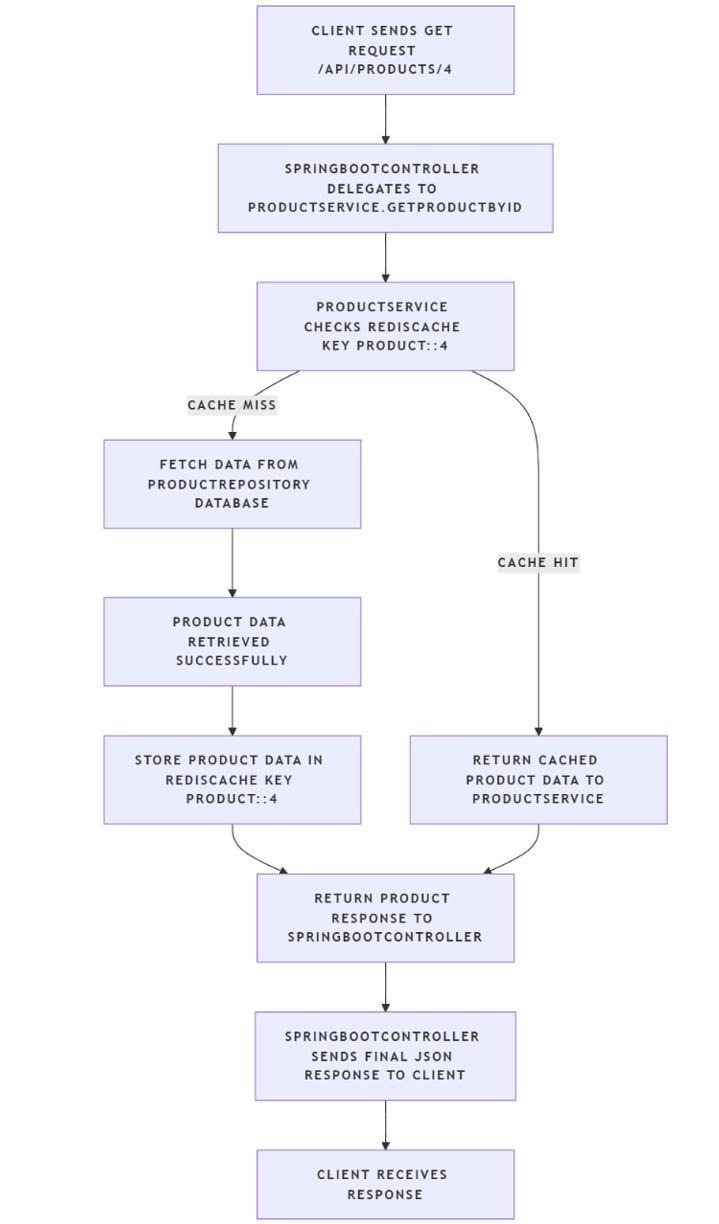
Architecture Overview
Project Setup
Step 1: Create a Spring Boot Project
Generate from https://start.spring.io
Dependencies
- Spring Web
- Spring Data JPA
- Spring Data Redis
- Lombok
- H2 Database (for demo)
Use
- Spring Boot: 3.2.x
- Java: 17+
- Build Tool: Maven
Folder Structure
springboot-redis-cache/
│
├── src/main/java/com/example/redis/
│   ├── controller/
│   │    └── ProductController.java
│   ├── entity/
│   │    └── Product.java
│   ├── repository/
│   │    └── ProductRepository.java
│   ├── service/
│   │    └── ProductService.java
│   ├── RedisCacheApplication.java
│
└── resources/
    ├── application.yml
    └── data.sql
Step-by-Step Implementation
Step 1 — The Product Entity
package com.example.rediscache.model;

import jakarta.persistence.*;
import lombok.*;

@Entity
@Table(name = "product")
@Data
@NoArgsConstructor
@AllArgsConstructor
public class Product {
    @Id
    @GeneratedValue(strategy = GenerationType.IDENTITY)
    private Long id;
    private String name;
    private Double price;
    /**
     * @return the id
     */

    // Default constructor (required for JPA and deserialization)
    public Product() {}

    // All-arguments constructor
    public Product(Long id, String name, double price) {
        this.id = id;
        this.name = name;
        this.price = price;
    }

    // Getters and setters
    public Long getId() { return id; }
    public void setId(Long id) { this.id = id; }

    public String getName() { return name; }
    public void setName(String name) { this.name = name; }

    public double getPrice() { return price; }
    public void setPrice(double price) { this.price = price; }
}
This simple entity represents a product stored in the database.
Step 2 — Repository
package com.example.rediscache.repository;

import com.example.rediscache.model.Product;
import org.springframework.data.jpa.repository.JpaRepository;
import org.springframework.stereotype.Repository;

@Repository
public interface ProductRepository extends JpaRepository<Product, Long> { }
Step 3 — Service Layer with Caching
package com.example.rediscache.service;

import com.example.rediscache.model.Product;
import com.example.rediscache.repository.ProductRepository;
import org.springframework.beans.factory.annotation.Autowired;
import org.springframework.cache.annotation.*;
import org.springframework.stereotype.Service;

import java.util.List;

@Service
@CacheConfig(cacheNames = {"product", "allProducts"})
public class ProductService {

    @Autowired
    private ProductRepository repo;

    @Cacheable(value = "product", key = "#id")
    public Product getProductById(Long id) {
        System.out.println("[DB] Fetching product by id: " + id);
        return repo.findById(id).orElse(null);
    }

    @Cacheable(value = "allProducts")
    public List<Product> getAllProducts() {
        System.out.println("[DB] Fetching all products");
        return repo.findAll();
    }

    @Caching(put = {@CachePut(value = "product", key = "#result.id")}, evict = {@CacheEvict(value = "allProducts", allEntries = true)})
    public Product saveOrUpdate(Product product) {
        Product p = repo.save(product);
        System.out.println("[DB] Saved product: " + p.getId());
        return p;
    }

    @CacheEvict(value = "product", key = "#id")
    public void deleteProduct(Long id) {
        repo.deleteById(id);
        System.out.println("[DB] Deleted product: " + id);
    }
}
Key annotations explained
| Annotation | Purpose |
|—-|—-|
| @Cacheable | First checks Redis; if not found, calls DB and stores in cache |
| @CachePut | Updates both the DB and the cache simultaneously |
| @CacheEvict | Removes the entry from the cache when a record is deleted |
| @CacheConfig | Sets a common cache name for the service |
Step 4 — Controller
package com.example.rediscache.controller;

import com.example.rediscache.model.Product;
import com.example.rediscache.service.ProductService;
import org.springframework.beans.factory.annotation.Autowired;
import org.springframework.http.ResponseEntity;
import org.springframework.web.bind.annotation.*;

import java.net.URI;
import java.util.List;

@RestController
@RequestMapping("/api/products")
public class ProductController {

    @Autowired
    private ProductService service;

    @GetMapping("/{id}")
    public ResponseEntity<Product> getProduct(@PathVariable Long id) {
        Product p = service.getProductById(id);
        if (p == null) return ResponseEntity.notFound().build();
        return ResponseEntity.ok(p);
    }

    @GetMapping
    public ResponseEntity<List<Product>> getAll() {
        return ResponseEntity.ok(service.getAllProducts());
    }

    @PostMapping
    public ResponseEntity<Product> create(@RequestBody Product product) {
        Product p = service.saveOrUpdate(product);
        return ResponseEntity.created(URI.create("/api/products/" + p.getId())).body(p);
    }

    @PutMapping("/{id}")
    public ResponseEntity<Product> update(@PathVariable Long id, @RequestBody Product product) {
        product.setId(id);
        Product p = service.saveOrUpdate(product);
        return ResponseEntity.ok(p);
    }

    @DeleteMapping("/{id}")
    public ResponseEntity<String> delete(@PathVariable Long id) {
        service.deleteProduct(id);
        return ResponseEntity.ok("Deleted");
    }
}
Step 5 — Configuration
spring:
  cache:
    type: redis
  redis:
    host: localhost
    port: 6379
  datasource:
    url: jdbc:h2:mem:testdb;DB_CLOSE_DELAY=-1;DB_CLOSE_ON_EXIT=FALSE
    driver-class-name: org.h2.Driver
    username: sa
    password:
  jpa:
    hibernate:
      ddl-auto: update
    show-sql: false

logging:
  level:
    root: INFO
    com.example.rediscache: DEBUG
Step 6 — Main Class
package com.example.rediscache;

import org.springframework.boot.SpringApplication;
import org.springframework.boot.autoconfigure.SpringBootApplication;
import org.springframework.cache.annotation.EnableCaching;

@SpringBootApplication
@EnableCaching
public class SpringbootRedisCacheApplication {
    public static void main(String[] args) {
        SpringApplication.run(SpringbootRedisCacheApplication.class, args);
    }
}
Step 7 — pom.xml
<dependencies>
    <dependency>
      <groupId>org.springframework.boot</groupId>
      <artifactId>spring-boot-starter-web</artifactId>
    </dependency>
    <dependency>
      <groupId>org.springframework.boot</groupId>
      <artifactId>spring-boot-starter-data-jpa</artifactId>
    </dependency>
    <dependency>
      <groupId>org.springframework.boot</groupId>
      <artifactId>spring-boot-starter-data-redis</artifactId>
    </dependency>
    <dependency>
      <groupId>org.springframework.boot</groupId>
      <artifactId>spring-boot-starter-cache</artifactId>
    </dependency>
    <dependency>
      <groupId>com.h2database</groupId>
      <artifactId>h2</artifactId>
      <scope>runtime</scope>
    </dependency>
    <dependency>
      <groupId>org.projectlombok</groupId>
      <artifactId>lombok</artifactId>
      <version>1.18.32</version>
      <scope>provided</scope>
    </dependency>
    <dependency>
      <groupId>org.springframework.boot</groupId>
      <artifactId>spring-boot-starter-test</artifactId>
      <scope>test</scope>
    </dependency>
  </dependencies>
Step-by-Step Validation
Step 1 — Start Redis
Run
redis-server
Keep it running. Verify in CMD
redis-cli ping
Output
PONG
Step 2 — Run the Spring Boot App
Run As → Java Application
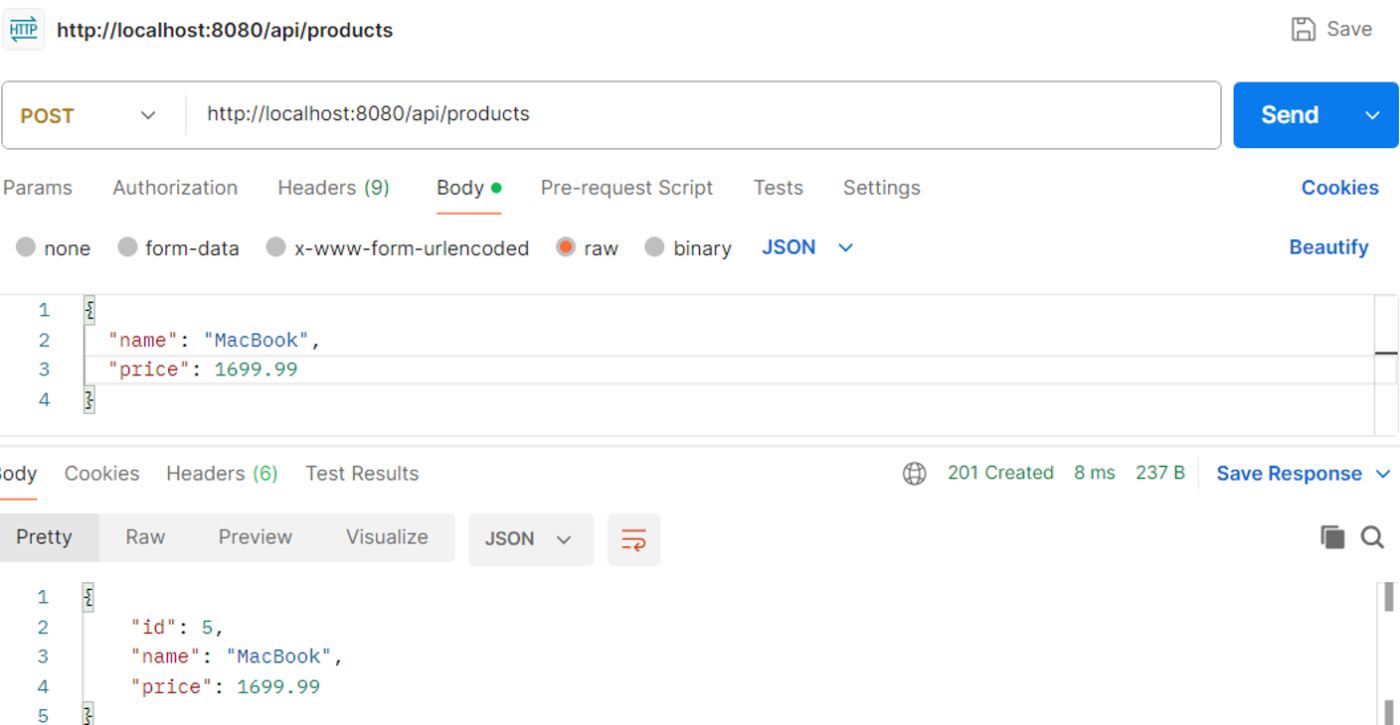
Step 3 — Add Products
POST → http://localhost:8080/api/products
{
  "name": "MacBook",
  "price": 1699.99
}
Console log
Fetching from DB for ID: 1
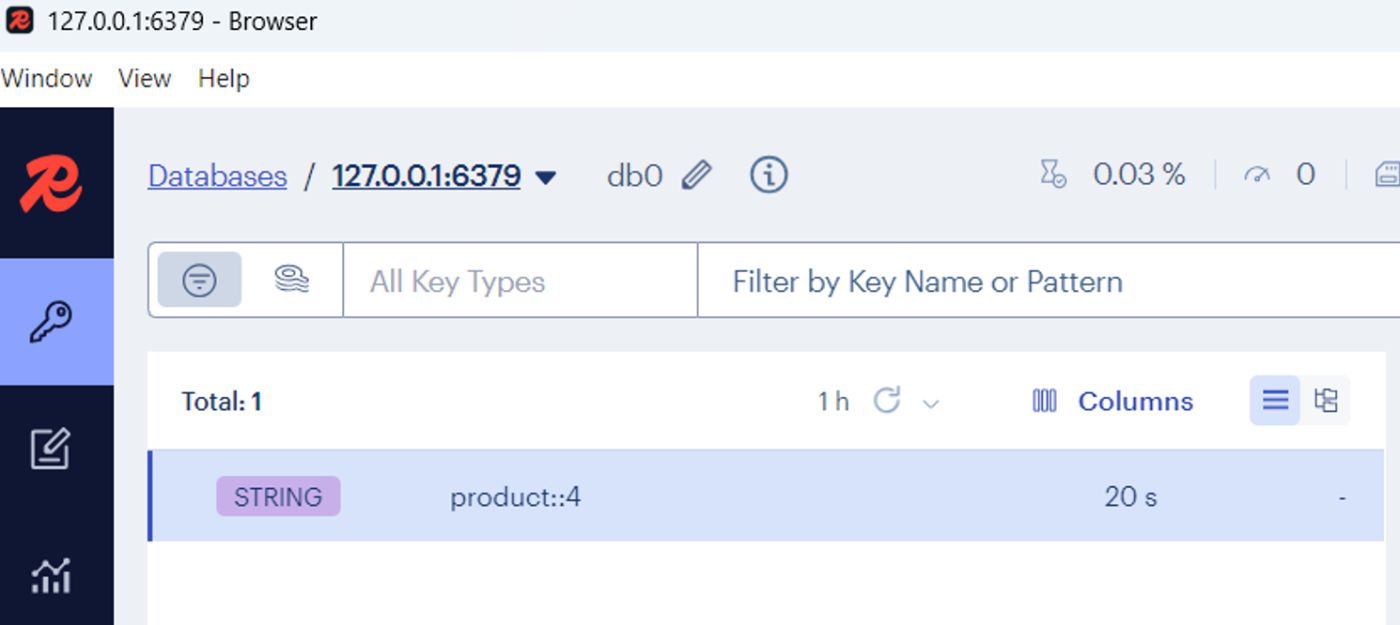
RedisInsight now shows a key:
products::4
Step 4 — Fetch Cached Product
GET → http://localhost:8080/products/1
Output (same as before), but console log doesn’t show “Fetching from DB” — because it’s now served directly from Redis.
Cache Hit Successful!
Step 5 — Delete Product and Verify Eviction
DELETE → http://localhost:8080/products/1
Then check RedisInsight again — the key products::1 disappears.
Cache Eviction Successful!
How It Works
First Request
- Cache is empty.
- Data is fetched from the database.
- Result stored in Redis under key products::1.
Next Requests
- Fetched directly from Redis (milliseconds response time).
Update/Delete
- @CachePut refreshes the cache after saving.
- @CacheEvict removes outdated entries.
Observing Redis in Real-Time (Using RedisInsight)
Open RedisInsight (https://redis.io/insight)
Steps:
-
Connect → localhost:6379
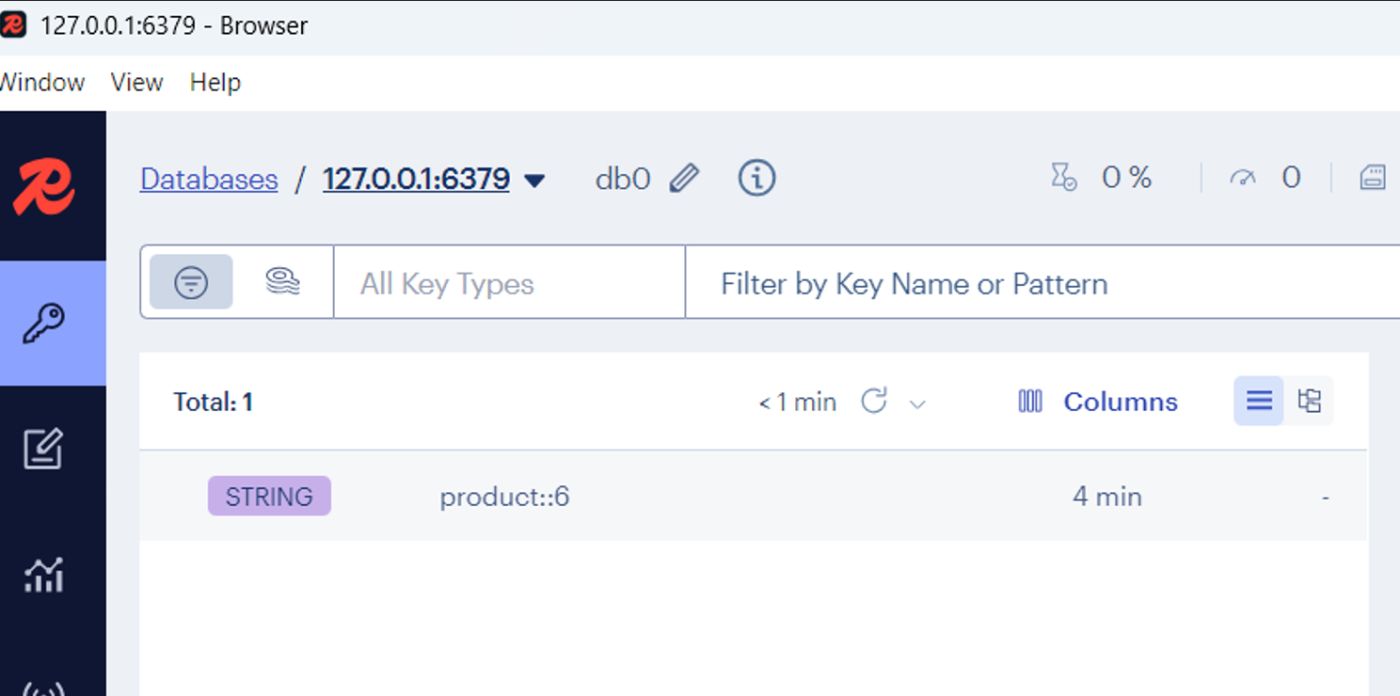
-
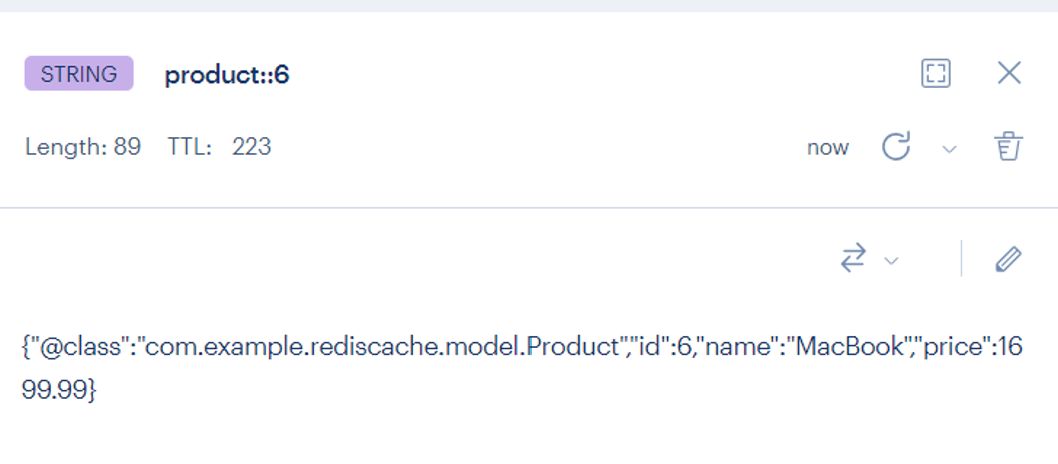
Go to “Keys” tab. You’ll see cached entries like products::1.
-
Double-click to view serialized data. You’ll see cached object details, including ID, name, and price.
-
On deletion, it disappears immediately — proving cache eviction.
-
You can set cache expiry to automatically refresh stale data
spring:
  cache:
    redis:
      time-to-live: 60000 # 60 seconds
Performance Comparison
| Operation Type | Without Cache (MySQL) | With Redis Cache |
|—-|—-|—-|
| First Fetch | ~120 ms | ~120 ms |
| Subsequent | ~5 ms | ~2 ms |
| Delete Product | 90 ms | 90 ms + Evict |
Result: ~60x faster on repeated reads!
Advantages of Redis Caching
| Benefit | Description |
|—-|—-|
| Blazing Fast | Data served from memory, not DB |
| Cost Efficient | Reduces DB reads & compute load |
| Smart Expiration | TTLs prevent stale data |
| Reusability | Cache layer works across services |
| Reliable | Redis supports clustering & persistence |
Real-World Scenarios
- Product Catalog/Inventory APIs → Cache product and pricing data for thousands of users.
- User Profile Data → Frequently accessed user details are cached for instant retrieval.
- Currency Conversion / Configurations → Cache frequently used lookups.
- Microservice Communication → Cache service responses to minimize inter-service latency.
Summary
By integrating Redis caching into your Spring Boot application
- You offload database pressure.
- You enhance user experience through faster responses.
- You build APIs that can handle higher concurrency efficiently.
| Concept | Description |
|—-|—-|
| @Cacheable | Fetch from cache or DB if missing |
| @CachePut | Update cache with new value |
| @CacheEvict | Remove entry from cache |
| Redis TTL | Expire cache automatically |
One design pattern, one configuration — massive performance gains.