Gaze control has always felt like a luxury feature. The good hardware, such as Tobii bars, dedicated IR trackers, costs more than the games you’d play with it, and every tutorial seems to assume you already own one. So I asked the obvious question: how far can I get with the webcam that’s already sitting on top of my monitor?
The answer, it turns out, is surprisingly far. Far enough to look around a 3D scene by moving my eyes. Far enough to aim a shooter with my gaze. And the whole thing runs on four Python libraries you can pip install in about ninety seconds.
Here’s how I built it, what actually made it work, and, just as importantly, where the illusion breaks down.
The core idea: iris landmarks, not eye-tracking hardware
The trick that makes this possible is MediaPipe’s Face Mesh with refine_landmarks=True. That flag unlocks a set of refined iris landmarks on top of the usual 468 face points. Landmark 468 is the center of the left iris; landmark 473 is the center of the right. Average the two, and you get a single normalized coordinate that tracks roughly where the eyes are pointed in the frame.
That’s the entire foundation. No calibration screen, no infrared, no dot-following ritual:
python
class EyeTracker:
    def __init__(self):
        self.mp_face_mesh = mp.solutions.face_mesh
        self.face_mesh = self.mp_face_mesh.FaceMesh(
            max_num_faces=1,
            refine_landmarks=True,      # <- this is what gives us the iris
            min_detection_confidence=0.5,
            min_tracking_confidence=0.5
        )

    def get_gaze_coordinates(self, frame):
        rgb = cv2.cvtColor(frame, cv2.COLOR_BGR2RGB)
        results = self.face_mesh.process(rgb)
        if not results.multi_face_landmarks:
            return None, None

        landmarks = results.multi_face_landmarks[0]
        left_iris  = landmarks.landmark[468]
        right_iris = landmarks.landmark[473]

        # average both eyes for a single gaze point (normalized 0..1)
        gaze_x = (left_iris.x + right_iris.x) / 2
        gaze_y = (left_iris.y + right_iris.y) / 2
        return gaze_x, gaze_y
Roughly fifteen lines and you have a live gaze signal. I nearly celebrated too early.
The part nobody warns you about: raw gaze is garbage
The first time I piped that signal straight into a camera rotation, the scene didn’t move, but it convulsed. Micro-saccades, webcam noise, a single blink, someone walking past in the background: every one of them jolted the view. Raw iris coordinates are jittery in a way that’s genuinely nauseating to look at.
So the real engineering isn’t the tracking. It’s the signal conditioning that turns a twitchy stream of numbers into something a human can stand to look at. I ended up stacking three techniques, in order.
1. A moving-average buffer. Keep the last five samples and average them. Cheap, and it kills most of the high-frequency jitter immediately.
python
self.gaze_history_x.append(norm_x)
if len(self.gaze_history_x) > self.history_size:   # history_size = 5
    self.gaze_history_x.pop(0)
smooth_x = sum(self.gaze_history_x) / len(self.gaze_history_x)
2. A dead zone. This one mattered more than I expected. Your eyes are never perfectly still, so if the very center of the screen triggers movement, the camera drifts constantly and you feel like you’re fighting it. A dead zone of 0.2 around center says: small movements mean hold still. Only a deliberate look toward the edges rotates the view.
python
if abs(smooth_x) < self.dead_zone:
    smooth_x = 0
else:
    # rescale so motion ramps smoothly from the dead-zone edge, not with a jump
    smooth_x = (smooth_x - np.sign(smooth_x) * self.dead_zone) / (1 - self.dead_zone)
3. Exponential interpolation toward a target. Instead of snapping the camera to the new angle, I ease toward it a fraction each frame. A smoothing factor of 0.15 means the view is always gliding, never teleporting.
python
target_yaw   =  smooth_x * self.sensitivity
target_pitch = -smooth_y * self.sensitivity      # invert Y for a natural feel
target_pitch = max(-80, min(80, target_pitch))   # clamp to dodge gimbal lock

self.yaw   += (target_yaw   - self.yaw)   * self.smoothing
self.pitch += (target_pitch - self.pitch) * self.smoothing
Moving average, dead zone, then exponential smoothing, and chained together, the difference is night and day. The convulsing scene became a camera that feels almost deliberate, like it’s reading intent rather than noise. And I exposed sensitivity and smoothing as live keyboard controls so I could tune the feel in real time instead of guessing.
Rendering: looking around a 3D world
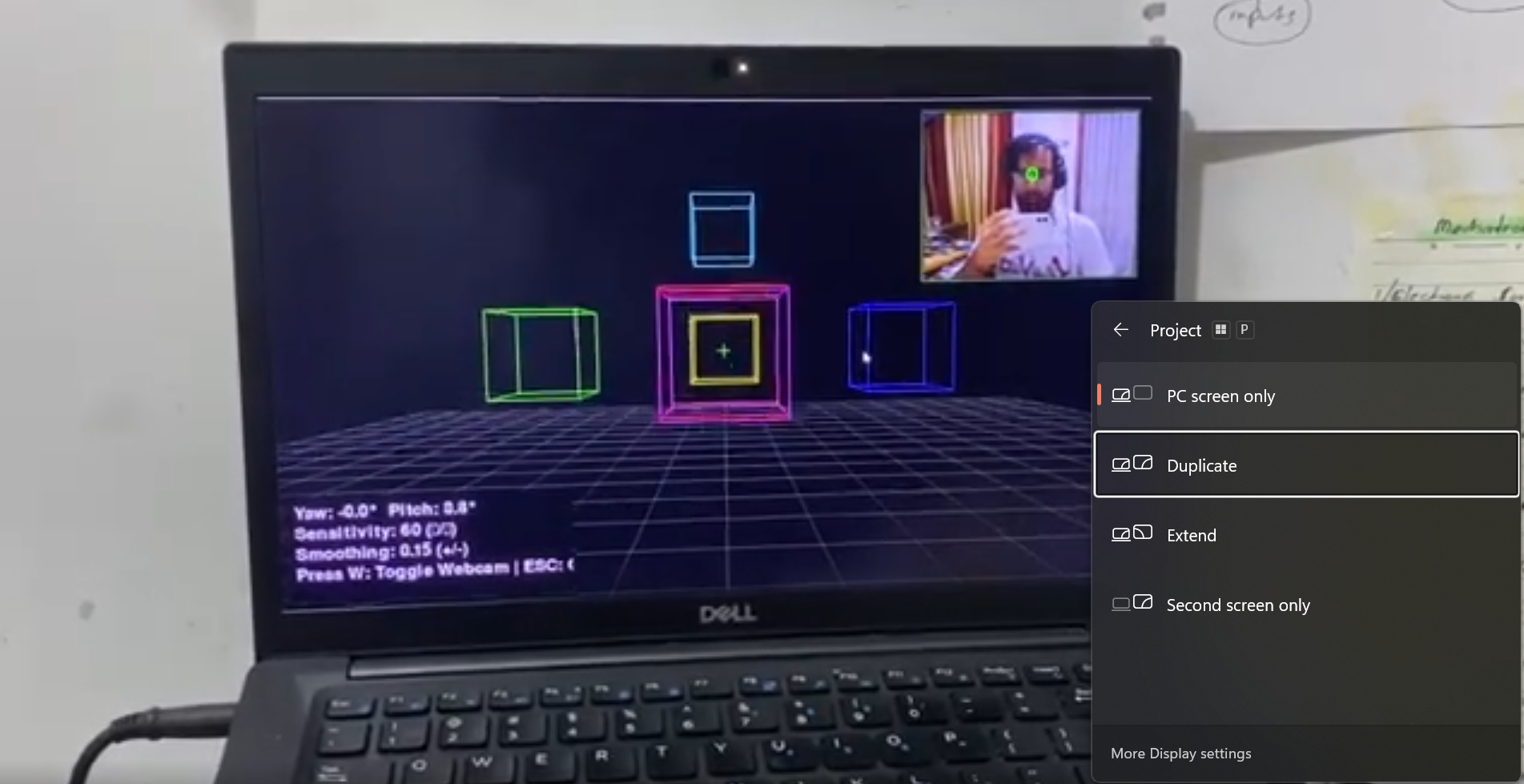
With a clean angle in hand, the camera itself is almost anticlimactic. Two rotations applied to the OpenGL matrix, and the whole scene, like a grid floor and a scatter of colored wireframe cubes that pivots around you:
python
def apply(self):
    glRotatef(self.pitch, 1, 0, 0)
    glRotatef(self.yaw,   0, 1, 0)
I kept a live webcam preview pinned in the top-right corner with a green dot drawn on the tracked iris position, plus a center crosshair and a HUD showing the current yaw, pitch, sensitivity, and smoothing. Being able to see what the tracker sees while you move is the single most useful debugging aid in a project like this, half the “bugs” turned out to be me sitting slightly off-center or a light behind my head.
The lesson that made it demo-able: degrade gracefully
Here’s the problem with a webcam-dependent demo: the moment you hand it to someone whose camera is busy, or who’s on a machine where MediaPipe won’t install cleanly, it’s dead on arrival. A cool prototype that only runs on your laptop isn’t a prototype anyone will try.
So every demo I built falls back, quietly, through a chain of options: real gaze if it can get it, mouse simulation if it can’t. The mouse just pretends to be your eyes, & same normalized coordinates, same downstream pipeline:
python
try:
    from gaze_camera_embedded import EyeTracker, Camera
    USE_REAL_GAZE = True
except Exception:
    EyeTracker = Camera = None      # no webcam stack? no problem

# ...later, when fetching a gaze sample:
if self.use_webcam and self.tracker and self.cap:
    ret, frame = self.cap.read()
    if ret:
        return self.tracker.get_gaze_coordinates(frame)
# fall through to mouse
mx, my = pygame.mouse.get_pos()
return mx / WINDOW_SIZE[0], my / WINDOW_SIZE[1]
This one architectural decision did more for the project than any tracking improvement. Anyone can run it right now, feel the interaction with their mouse, and then decide whether to plug in a camera. The gaze becomes an upgrade, not a barrier to entry.
From camera to crosshair: the eye-aim shooter
Once gaze is just a normalized coordinate, you can point it at anything. So I wired the same tracker into a tiny shooter: targets spawn around the screen, your eyes drive the reticle, and a click fires wherever you’re looking.
python
gx, gy = self.tracker.get_gaze_coordinates(frame)
sx = int(gx * WINDOW_SIZE[0])
sy = int(gy * WINDOW_SIZE[1])
return (sx, sy)      # aim point in screen pixels
Aiming with your eyes is a genuinely strange feeling the first time, and you look at a target and the crosshair is already there. It’s also where the limitations get loud, which brings me to the honest part.
Where the illusion breaks down
I want to be straight about what this is, because it’s easy to oversell.
This isn’t true gaze estimation: it’s iris position. What I’m tracking is where your irises sit inside the camera frame, which moves both when your eyes move and when your head moves. Real eye-trackers estimate the direction your eyes are pointing relative to your head, with a calibration step to map it onto the screen. This prototype skips all of that. In practice it means head movement and eye movement get blended together, and “looking” at the far corner of the screen often means tilting your head a little too.
It’s uncalibrated. There’s no mapping from your eyes to your screen, so the sensitivity and dead-zone values are one-size-fits-all. They feel great for some faces and camera placements and mediocre for others.
Lighting is destiny. MediaPipe is robust, but a webcam in a dim room, strong backlight, or glasses with glare will degrade the iris landmarks and make the whole thing wobble.
Precision is limited. Fine aiming is the difference between two small targets a few pixels apart, and it is beyond what averaged iris centers can reliably deliver. This is a great fit for looking around, glancing at menus, or coarse aiming. It is not going to win you a ranked match.
None of that makes it useless. It makes it honest about its niche: accessible, hardware-free, good-enough gaze for exploration and casual interaction, and a genuinely fun way to prototype eye-driven UX before committing to real hardware.
What I’d build next
The obvious next step is a real calibration pass, and have the player look at a few known points, fit a mapping, and decouple head pose from eye direction. Estimating head orientation from the face mesh and subtracting it out would fix the biggest weirdness. And a proper PyGaze path (which I stubbed in) would let the same demos drive real eye-tracker hardware when it’s available, falling back to the webcam when it’s not the same graceful-degradation idea, one tier up.
But the thing I keep coming back to is how little it took to cross the line from “sci-fi feature” to “runs on my laptop tonight.” Four libraries, one clever landmark, and a smoothing pipeline that respects how twitchy human eyes actually are. The hardware was never the hard part. Making the signal feel human was.
If you’ve got a webcam and an afternoon, you can look around a world with your eyes too. Just budget most of your time for the smoothing, trust me.
Watch my demo:
https://youtu.be/EeGn71KjPZA?si=fsBGWZYjGyHlGDDf&embedable=true
You can access my project on GitHub (contributions are welcome).