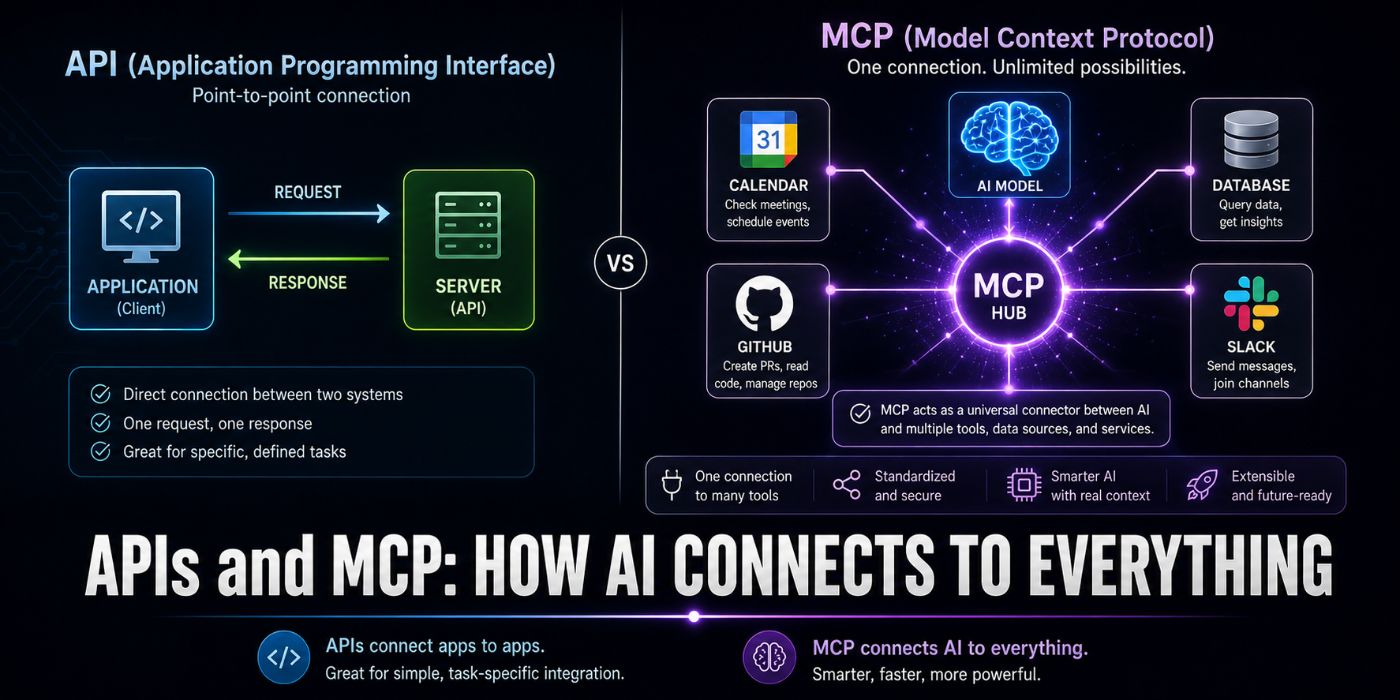
Every app you use is powered by APIs. Every AI agent you will build needs MCP. This guide teaches you both from scratch: what they are, how they work, why they exist, real-world use cases, and step-by-step how to use and build them yourself. By the end, you should understand the two protocols that power modern AI development.
Two questions started this article:
A developer at my cloud computing bootcamp raised her hand during Week 4 and asked two questions that stopped me cold, not because they were basic, but because they exposed a gap that almost every beginner faces:
- “What exactly IS an API? Like what is actually happening?”
- And then, a week later: “Everyone keeps saying MCP. What does that actually mean and why should I care?”
These are the right questions. They are also questions that most tutorials skip because they assume you already know the answer. This article does not skip them.
PART 1: APIs, The Foundation of Everything
What is an API, actually?
API stands for Application Programming Interface. That definition tells you almost nothing, so let’s try a better one.
An API is a defined way for two pieces of software to talk to each other.
That’s it. That’s the whole thing.
The word “interface” is the key. An interface is a defined boundary between two things. The steering wheel of a car is an interface between you and the car’s engine; you do not need to understand combustion to drive. An API is the same thing: a defined boundary between your code and someone else’s software, so you do not need to understand their implementation to use their functionality.
Here is the simplest possible example. When your weather app shows you tomorrow’s forecast, it does not have its own weather satellites. It calls a weather API; it sends a request to a weather company’s servers, and the weather company’s servers send back forecast data. Your app and the weather company’s servers never share code, never share a database, and may be running in completely different programming languages. They communicate only through the API.
YOUR APP                    WEATHER API SERVER
    │                              │
    │  "Give me the forecast       │
    │   for London tomorrow"       │
    │─────────────────────────────>│
    │                              │
    │  "Temperature: 18°C,         │
    │   Condition: Cloudy,         │
    │   Rain probability: 40%"     │
    │<─────────────────────────────│
This exchange happens in milliseconds, over the internet, every time you open your weather app. The weather company does not know or care what language your app is written in. Your app does not know or care how the weather company stores or calculates forecast data. The API is the contract that makes it work regardless.
How APIs Work
Modern web APIs follow a pattern called REST (Representational State Transfer). REST APIs use HTTP, the same protocol your browser uses to load web pages, to send requests and receive responses.
Every API call has four components:
1. The URL (what resource you want)
https://api.openweathermap.org/data/2.5/weather?q=London&appid=YOUR_KEY
This URL has three parts:
https://api.openweathermap.org: the server (where to go)/data/2.5/weather: the endpoint (what you want)?q=London&appid=YOUR_KEY: the parameters (how to filter it)
2. The HTTP Method (what you want to do)
APIs use different HTTP methods to signal different types of actions:
|
Method |
What it means |
Real example |
|---|---|---|
|
|
Retrieve data |
Get a list of tasks |
|
|
Create something new |
Create a new task |
|
|
Replace something entirely |
Replace task details |
|
|
Update part of something |
Mark a task as done |
|
|
Remove something |
Delete a task |
3. The Request (what you’re sending)
Most requests include:
- Headers : metadata about the request (authentication, content type)
- Body: data you’re sending (for POST, PUT, PATCH)
POST /tasks HTTP/1.1
Host: api.taskflow.io
Authorization: Bearer sk_live_abc123
Content-Type: application/json

{
  "title": "Review Q3 report",
  "priority": "high",
  "due_date": "2026-08-01"
}
4. The Response (what you get back)
HTTP/1.1 201 Created
Content-Type: application/json

{
  "id": "task_7Km3pQx9",
  "title": "Review Q3 report",
  "priority": "high",
  "due_date": "2026-08-01",
  "status": "todo",
  "created_at": "2026-07-22T10:30:00Z"
}
The response always includes a status code, a three-digit number that tells you whether the request worked:
|
Status |
Meaning |
What it looks like |
|---|---|---|
|
|
Success |
Worked perfectly |
|
|
Created |
New resource created |
|
|
Your fault |
You sent invalid data |
|
|
Auth failed |
Wrong or missing API key |
|
|
No permission |
Valid key but wrong access |
|
|
Missing |
That resource doesn’t exist |
|
|
Rate limited |
Slow down |
|
|
Their fault |
Server problem |
Your First Real API Call Step by Step
Let us make a real API call to a real API right now. We’ll use the Open Meteo weather API, completely free, no sign-up required.
Using curl (works in any terminal):
curl "https://api.open-meteo.com/v1/forecast?latitude=51.5074&longitude=-0.1278¤t_weather=true"
Run that. You should see something like:
{
  "latitude": 51.5,
  "longitude": -0.125,
  "current_weather": {
    "temperature": 17.4,
    "windspeed": 12.3,
    "weathercode": 3,
    "time": "2026-07-22T10:00"
  }
}
You just called an API. Let’s break down what happened:
- Your terminal sent an HTTP GET request to
api.open-meteo.com - The server received your request and read the parameters:
latitude=51.5074&longitude=-0.1278 - The server looked up current weather for those coordinates
- The server sent back a JSON response
- Your terminal displayed that response
Using Python:
import requests

# Call the weather API
response = requests.get(
    "https://api.open-meteo.com/v1/forecast",
    params={
        "latitude": 51.5074,   # London latitude
        "longitude": -0.1278,  # London longitude
        "current_weather": True,
        "hourly": "temperature_2m",
        "forecast_days": 1
    }
)

# Check it worked
if response.status_code == 200:
    data = response.json()
    weather = data["current_weather"]
    print(f"Temperature in London: {weather['temperature']}°C")
    print(f"Wind speed: {weather['windspeed']} km/h")
else:
    print(f"Error: {response.status_code}")
    print(response.json())
Using JavaScript (fetch):
const response = await fetch(
  'https://api.open-meteo.com/v1/forecast?' +
  new URLSearchParams({
    latitude: 51.5074,
    longitude: -0.1278,
    current_weather: true
  })
);

const data = await response.json();
console.log(`Temperature: ${data.current_weather.temperature}°C`);
Authentication: How APIs Know Who You Are
Most production APIs require authentication, a way of proving who you are before they give you access. The most common method is an API key, a unique string that identifies you.
import requests

# This is how most authenticated API calls look
response = requests.get(
    "https://api.stripe.com/v1/customers",
    headers={
        # API key goes in the Authorization header
        "Authorization": "Bearer sk_test_your_key_here"
    }
)
Three golden rules of API keys:
- Never put API keys in your code. Use environment variables.
- Never commit API keys to Git.
.envfiles go in.gitignore. - Rotate API keys if you accidentally expose them.
import os
import requests

#  Correct — key from environment variable
api_key = os.environ.get("STRIPE_API_KEY")
response = requests.get(
    "https://api.stripe.com/v1/customers",
    headers={"Authorization": f"Bearer {api_key}"}
)

#  Wrong — key hardcoded in source code
response = requests.get(
    "https://api.stripe.com/v1/customers",
    headers={"Authorization": "Bearer sk_test_abc123"}  # Never do this
)
Real-World API Use Cases
APIs power virtually everything you use every day:
- Payments: when you pay on any website, a payment API (Stripe, PayPal) handles the transaction. The website never touches your card details directly.
- Authentication: “Sign in with Google” is a Google OAuth API call. The website never stores your Google password.
- Maps: Every embedded map is a Google Maps or Mapbox API call. The website does not maintain its own map data.
- AI features: When a product has a “summarise this” button, it calls OpenAI, Anthropic, or AWS Bedrock’s API.
- Communication: every SMS you receive from a service was sent via Twilio’s API. Every transactional email via SendGrid’s API.
- Weather, finance, sport, news: anything that requires real-time external data comes through an API.
Understanding APIs means understanding how the entire internet works. Every modern application is a collection of API calls assembled into a user interface.
Building Your Own API: A Complete Working Example
Now let’s flip it. Instead of calling someone else’s API, let’s build one.
We will build a simple Task API using Python and FastAPI, one of the most popular API frameworks in 2026:
pip install fastapi uvicorn
# task_api.py
from fastapi import FastAPI, HTTPException, Header
from pydantic import BaseModel
from typing import Optional
from datetime import datetime
import uuid

app = FastAPI(
    title="Task API",
    description="A simple task management API — built from scratch",
    version="1.0.0"
)

# In-memory storage (use a database in production)
tasks_db = {}

# Valid API keys (use a proper auth system in production)
VALID_API_KEYS = {"sk_dev_abc123", "sk_dev_xyz456"}


# ── Data Models ──────────────────────────────────────────────
class CreateTaskRequest(BaseModel):
    """What clients send when creating a task"""
    title: str
    description: Optional[str] = None
    priority: str = "medium"
    due_date: Optional[str] = None

class Task(BaseModel):
    """What the API returns for a task"""
    id: str
    title: str
    description: Optional[str]
    priority: str
    status: str
    due_date: Optional[str]
    created_at: str


# ── Authentication helper ─────────────────────────────────────
def verify_api_key(authorization: str = Header(...)):
    """
    Check the Authorization header contains a valid API key.
    Called on every protected endpoint.
    """
    if not authorization.startswith("Bearer "):
        raise HTTPException(
            status_code=401,
            detail="Authorization header must start with 'Bearer '"
        )

    api_key = authorization.replace("Bearer ", "")
    if api_key not in VALID_API_KEYS:
        raise HTTPException(
            status_code=401,
            detail="Invalid API key"
        )
    return api_key


# ── Endpoints ─────────────────────────────────────────────────

@app.post("/tasks", status_code=201)
def create_task(
    request: CreateTaskRequest,
    authorization: str = Header(...)
):
    """Create a new task"""
    verify_api_key(authorization)

    # Validate priority
    valid_priorities = {"low", "medium", "high", "critical"}
    if request.priority not in valid_priorities:
        raise HTTPException(
            status_code=400,
            detail=f"priority must be one of: {', '.join(valid_priorities)}"
        )

    # Create the task
    task_id = f"task_{uuid.uuid4().hex[:8]}"
    task = {
        "id": task_id,
        "title": request.title,
        "description": request.description,
        "priority": request.priority,
        "status": "todo",
        "due_date": request.due_date,
        "created_at": datetime.utcnow().isoformat() + "Z"
    }

    tasks_db[task_id] = task
    return task


@app.get("/tasks")
def list_tasks(
    status: Optional[str] = None,
    priority: Optional[str] = None,
    authorization: str = Header(...)
):
    """List all tasks with optional filters"""
    verify_api_key(authorization)

    tasks = list(tasks_db.values())

    # Apply filters
    if status:
        tasks = [t for t in tasks if t["status"] == status]
    if priority:
        tasks = [t for t in tasks if t["priority"] == priority]

    return {
        "data": tasks,
        "total": len(tasks)
    }


@app.get("/tasks/{task_id}")
def get_task(task_id: str, authorization: str = Header(...)):
    """Get a specific task by ID"""
    verify_api_key(authorization)

    task = tasks_db.get(task_id)
    if not task:
        raise HTTPException(
            status_code=404,
            detail=f"Task {task_id} not found"
        )
    return task


@app.patch("/tasks/{task_id}")
def update_task(
    task_id: str,
    updates: dict,
    authorization: str = Header(...)
):
    """Update a task (partial update)"""
    verify_api_key(authorization)

    task = tasks_db.get(task_id)
    if not task:
        raise HTTPException(status_code=404, detail="Task not found")

    # Only allow updating certain fields
    allowed_fields = {"title", "description", "priority", "status", "due_date"}
    for field, value in updates.items():
        if field in allowed_fields:
            task[field] = value

    tasks_db[task_id] = task
    return task


@app.delete("/tasks/{task_id}", status_code=204)
def delete_task(task_id: str, authorization: str = Header(...)):
    """Delete a task"""
    verify_api_key(authorization)

    if task_id not in tasks_db:
        raise HTTPException(status_code=404, detail="Task not found")

    del tasks_db[task_id]
    return None


# Run it
if __name__ == "__main__":
    import uvicorn
    uvicorn.run(app, host="0.0.0.0", port=8000)
Run and test your API:
# Terminal 1: Start the API
python task_api.py

# Terminal 2: Test it

# Create a task
curl -X POST http://localhost:8000/tasks
  -H "Authorization: Bearer sk_dev_abc123"
  -H "Content-Type: application/json"
  -d '{"title": "Learn about MCP", "priority": "high"}'

# List all tasks
curl http://localhost:8000/tasks
  -H "Authorization: Bearer sk_dev_abc123"

# Get specific task (use ID from create response)
curl http://localhost:8000/tasks/task_abc12345
  -H "Authorization: Bearer sk_dev_abc123"

# Mark as done
curl -X PATCH http://localhost:8000/tasks/task_abc12345
  -H "Authorization: Bearer sk_dev_abc123"
  -H "Content-Type: application/json"
  -d '{"status": "done"}'
FastAPI also generates automatic interactive documentation. Open http://localhost:8000/docs in your browser, you will see a complete, interactive API explorer generated automatically from your code.
You have now built a complete, working API. That is Part 1.
PART 2: MCP—The Protocol That Changes Everything for AI
The Problem MCP Solves
You now understand APIs. So let me ask you a question.
You are building an AI assistant. You want it to be able to:
- Check your calendar before scheduling a meeting
- Search your company’s internal documentation
- Create a Jira ticket when it finds a bug
- Query your database for customer data
- Send a Slack message to notify your team
Before MCP, here is what you had to do for each capability:
- Understand that API’s authentication method
- Write a custom integration function for that specific API
- Write code to convert that API’s response into a format your AI model understands
- Write this separately for every AI model you use (OpenAI format, Claude format, Gemini format all differ)
- Maintain all of this as every API and every AI model evolves
Five capabilities, five separate integrations, each one custom, each one requiring maintenance. Scale this to fifty enterprise tools and the integration work becomes the entire project.
The analogy Anthropic and the broader community have used is USB-C. Before USB-C, every device manufacturer shipped proprietary chargers and connectors. Users accumulated drawers full of incompatible cables. USB-C replaced that chaos with a single universal standard. MCP does the same for AI-tool connectivity. Instead of building custom API wrappers for every model-tool pair, developers expose their tools and data through MCP servers, and any MCP-compatible AI host can connect to them. One standardised protocol replaces hundreds of point-to-point integrations.
What MCP Actually Is
Model Context Protocol (MCP) is an open, vendor-neutral standard released by Anthropic that defines how AI models connect to external tools, databases, and APIs.
Anthropic released MCP as an open-source protocol in November 2024. Although the initial release targeted Anthropic’s own products, particularly Claude Desktop, Anthropic designed the specification to be vendor-neutral from the start. Adoption accelerated rapidly. By March 2025, OpenAI announced MCP support in its Agents SDK and ChatGPT desktop application.
By 2026, MCP has achieved near-universal adoption across the AI stack; Anthropic, OpenAI, Google, and Microsoft have all integrated MCP support into their flagship products.
In plain English: MCP is the standard way for an AI to discover and use tools. Any AI that supports MCP can use any tool that exposes an MCP server. You build the integration once, and it works with every MCP-compatible AI.
How MCP Works
MCP has three components that always appear together:
┌─────────────────────────────────────────────────────┐
│                    MCP HOST                          │
│    (Claude Desktop, VS Code, your AI application)   │
│                                                      │
│    ┌──────────────────────────────────────┐         │
│    │           MCP CLIENT                 │         │
│    │  (manages connections to MCP servers)│         │
│    └──────────────┬───────────────────────┘         │
│                   │ MCP Protocol                     │
└───────────────────┼─────────────────────────────────┘
                    │
       ┌────────────┼────────────┐
       │            │            │
       ▼            ▼            ▼
  ┌─────────┐ ┌─────────┐ ┌─────────┐
  │   MCP   │ │   MCP   │ │   MCP   │
  │ SERVER  │ │ SERVER  │ │ SERVER  │
  │         │ │         │ │         │
  │ Calendar│ │  GitHub │ │  Slack  │
  └─────────┘ └─────────┘ └─────────┘
MCP Host: the application that contains the AI model. Claude Desktop, GitHub Copilot, your custom AI app.
MCP Client: lives inside the host. Manages connections to MCP servers. When the AI decides to use a tool, the client handles the communication.
MCP Server: a program that exposes tools, resources, and prompts to any MCP client. You build one of these for each system you want to connect to AI.
The Three Things MCP Servers Expose
MCP operates on three primary capability types that define what an AI can do:
Tools: executable functions
Tools are things the AI can call to take actions or retrieve computed results:
# Example tool: search a database
@mcp.tool()
def search_customers(query: str, limit: int = 10) -> list:
    """Search the customer database by name or email"""
    # AI calls this when it needs customer data
    return db.search(query, limit=limit)
When the AI decides it needs to find a customer, it calls this tool. The tool runs the actual database query and returns results. The AI never touches the database directly, it only communicates through the MCP protocol.
Resources: data the AI can read
Resources are data sources the AI can access for context:
# Example resource: company documentation
@mcp.resource("docs://{section}")
def get_documentation(section: str) -> str:
    """Read a section of internal documentation"""
    return docs_store.get(section)
Resources are read-only. The AI can read them to get context for answering questions. A knowledge base, a documentation system, or a file system would all be exposed as resources.
Prompts: reusable templates
Prompts are pre-built templates that guide how the AI should interact with specific tools:
# Example prompt: code review template
@mcp.prompt()
def code_review_prompt(language: str, code: str) -> str:
    """A standardised prompt for reviewing code"""
    return f"""Review this {language} code for:
1. Security vulnerabilities
2. Performance issues
3. Code style and readability

Code:
{code}

Provide specific, actionable feedback."""
Building Your First MCP Server: Complete Step-by-Step
We will build an MCP server that connects an AI to your Task API from Part 1. This means any MCP-compatible AI (Claude, GPT-4o, Gemini) can create, read, and manage tasks by talking to your API through the MCP server.
Install the MCP SDK:
pip install mcp requests
Build the complete MCP server:
# task_mcp_server.py
"""
MCP Server for the Task API.

This server exposes the Task API to any MCP-compatible AI.
Once running, Claude Desktop (or any MCP host) can discover
and use these tools automatically.

Run with: python task_mcp_server.py
"""

import json
import requests
import os
from mcp.server import Server
from mcp.server.stdio import stdio_server
from mcp import types

# Task API configuration
TASK_API_BASE = os.environ.get("TASK_API_URL", "http://localhost:8000")
TASK_API_KEY = os.environ.get("TASK_API_KEY", "sk_dev_abc123")

# Create the MCP server
server = Server("task-manager")

# Shared HTTP session
session = requests.Session()
session.headers.update({
    "Authorization": f"Bearer {TASK_API_KEY}",
    "Content-Type": "application/json"
})


# ── Helper function ───────────────────────────────────────────
def call_api(method: str, path: str, data: dict = None) -> dict:
    """Call the Task API and handle errors"""
    url = f"{TASK_API_BASE}{path}"

    try:
        if method == "GET":
            response = session.get(url, params=data)
        elif method == "POST":
            response = session.post(url, json=data)
        elif method == "PATCH":
            response = session.patch(url, json=data)
        elif method == "DELETE":
            response = session.delete(url)
            if response.status_code == 204:
                return {"success": True, "message": "Deleted successfully"}
            return response.json()

        if response.status_code >= 400:
            error = response.json()
            return {"error": True, "message": error.get("detail", "API error")}

        return response.json()

    except requests.exceptions.ConnectionError:
        return {
            "error": True,
            "message": "Cannot connect to Task API. Is it running?"
        }


# ── Tool Definitions ──────────────────────────────────────────
# This tells the MCP client what tools are available.
# The AI reads these descriptions to decide which tool to call.

@server.list_tools()
async def list_tools() -> list[types.Tool]:
    """Return all available tools to the MCP client"""
    return [
        types.Tool(
            name="create_task",
            description=(
                "Create a new task in the task management system. "
                "Use this when the user wants to add a new task, "
                "to-do item, or action item."
            ),
            inputSchema={
                "type": "object",
                "required": ["title"],
                "properties": {
                    "title": {
                        "type": "string",
                        "description": "The task title (required)"
                    },
                    "description": {
                        "type": "string",
                        "description": "Detailed task description (optional)"
                    },
                    "priority": {
                        "type": "string",
                        "enum": ["low", "medium", "high", "critical"],
                        "description": "Task priority level. Default: medium",
                        "default": "medium"
                    },
                    "due_date": {
                        "type": "string",
                        "description": "Due date in YYYY-MM-DD format (optional)"
                    }
                }
            }
        ),

        types.Tool(
            name="list_tasks",
            description=(
                "List all tasks. Can filter by status or priority. "
                "Use this when the user asks to see their tasks, "
                "what's on their to-do list, or what's due."
            ),
            inputSchema={
                "type": "object",
                "properties": {
                    "status": {
                        "type": "string",
                        "enum": ["todo", "in_progress", "done", "cancelled"],
                        "description": "Filter by status (optional)"
                    },
                    "priority": {
                        "type": "string",
                        "enum": ["low", "medium", "high", "critical"],
                        "description": "Filter by priority (optional)"
                    }
                }
            }
        ),

        types.Tool(
            name="get_task",
            description="Get details of a specific task by its ID.",
            inputSchema={
                "type": "object",
                "required": ["task_id"],
                "properties": {
                    "task_id": {
                        "type": "string",
                        "description": "The task ID (starts with task_)"
                    }
                }
            }
        ),

        types.Tool(
            name="update_task",
            description=(
                "Update a task's details or status. "
                "Use this to mark tasks as done, change priority, "
                "or update any task field."
            ),
            inputSchema={
                "type": "object",
                "required": ["task_id"],
                "properties": {
                    "task_id": {
                        "type": "string",
                        "description": "The task ID to update"
                    },
                    "status": {
                        "type": "string",
                        "enum": ["todo", "in_progress", "done", "cancelled"],
                        "description": "New status"
                    },
                    "priority": {
                        "type": "string",
                        "enum": ["low", "medium", "high", "critical"],
                        "description": "New priority"
                    },
                    "title": {
                        "type": "string",
                        "description": "New title"
                    },
                    "due_date": {
                        "type": "string",
                        "description": "New due date in YYYY-MM-DD format"
                    }
                }
            }
        ),

        types.Tool(
            name="delete_task",
            description=(
                "Delete a task permanently. "
                "Use this when the user explicitly asks to remove or delete a task. "
                "Always confirm with the user before deleting."
            ),
            inputSchema={
                "type": "object",
                "required": ["task_id"],
                "properties": {
                    "task_id": {
                        "type": "string",
                        "description": "The task ID to delete"
                    }
                }
            }
        )
    ]


# ── Tool Execution ────────────────────────────────────────────
# This runs when the AI decides to call a tool.

@server.call_tool()
async def call_tool(
    name: str,
    arguments: dict
) -> list[types.TextContent]:
    """Execute a tool call from the AI"""

    result = None

    if name == "create_task":
        result = call_api("POST", "/tasks", {
            "title": arguments["title"],
            "description": arguments.get("description"),
            "priority": arguments.get("priority", "medium"),
            "due_date": arguments.get("due_date")
        })

    elif name == "list_tasks":
        params = {}
        if "status" in arguments:
            params["status"] = arguments["status"]
        if "priority" in arguments:
            params["priority"] = arguments["priority"]
        result = call_api("GET", "/tasks", params if params else None)

    elif name == "get_task":
        result = call_api("GET", f"/tasks/{arguments['task_id']}")

    elif name == "update_task":
        task_id = arguments.pop("task_id")
        result = call_api("PATCH", f"/tasks/{task_id}", arguments)

    elif name == "delete_task":
        result = call_api("DELETE", f"/tasks/{arguments['task_id']}")

    else:
        result = {"error": True, "message": f"Unknown tool: {name}"}

    # Return result as formatted text
    return [types.TextContent(
        type="text",
        text=json.dumps(result, indent=2)
    )]


# ── Resources ─────────────────────────────────────────────────
# Data the AI can read for context

@server.list_resources()
async def list_resources() -> list[types.Resource]:
    """Return available resources"""
    return [
        types.Resource(
            uri="tasks://summary",
            name="Task Summary",
            description="A summary of all current tasks grouped by status",
            mimeType="application/json"
        )
    ]


@server.read_resource()
async def read_resource(uri: str) -> str:
    """Return resource content"""
    if uri == "tasks://summary":
        all_tasks = call_api("GET", "/tasks")

        if "error" in all_tasks:
            return json.dumps({"error": "Could not load tasks"})

        tasks = all_tasks.get("data", [])

        # Group by status
        summary = {
            "todo": [],
            "in_progress": [],
            "done": [],
            "cancelled": []
        }

        for task in tasks:
            status = task.get("status", "todo")
            if status in summary:
                summary[status].append({
                    "id": task["id"],
                    "title": task["title"],
                    "priority": task["priority"]
                })

        return json.dumps({
            "total_tasks": len(tasks),
            "by_status": {
                status: len(items)
                for status, items in summary.items()
            },
            "tasks": summary
        }, indent=2)

    raise ValueError(f"Resource not found: {uri}")


# ── Prompts ───────────────────────────────────────────────────

@server.list_prompts()
async def list_prompts() -> list[types.Prompt]:
    """Return available prompt templates"""
    return [
        types.Prompt(
            name="daily_review",
            description="Review today's tasks and plan priorities",
            arguments=[
                types.PromptArgument(
                    name="focus_area",
                    description="What to focus on today (optional)",
                    required=False
                )
            ]
        )
    ]


@server.get_prompt()
async def get_prompt(
    name: str,
    arguments: dict | None
) -> types.GetPromptResult:
    """Return a prompt template"""
    if name == "daily_review":
        focus = arguments.get("focus_area", "everything") if arguments else "everything"
        return types.GetPromptResult(
            description="Daily task review prompt",
            messages=[
                types.PromptMessage(
                    role="user",
                    content=types.TextContent(
                        type="text",
                        text=f"""Please review my current tasks and help me plan my day.

Focus area: {focus}

Please:
1. Show me all my current tasks using the list_tasks tool
2. Identify the highest priority items
3. Suggest a realistic plan for today
4. Flag any overdue items
5. Ask if I want to create any new tasks

Start by fetching my task list."""
                    )
                )
            ]
        )
    raise ValueError(f"Prompt not found: {name}")


# ── Run the server ─────────────────────────────────────────────
async def main():
    """Start the MCP server using stdio transport"""
    async with stdio_server() as (read_stream, write_stream):
        await server.run(
            read_stream,
            write_stream,
            server.create_initialization_options()
        )


if __name__ == "__main__":
    import asyncio
    asyncio.run(main())
Connect Your MCP Server to Claude Desktop
Now let’s connect the server to Claude Desktop so you can actually use it:
Step 1: Install Claude Desktop. Download from claude.ai/download
Step 2: Find the config file
# macOS
open ~/Library/Application Support/Claude/

# Windows
# %APPDATA%Claude

# The file to edit:
# claude_desktop_config.json
Step 3: Add your MCP server
{
  "mcpServers": {
    "task-manager": {
      "command": "python",
      "args": ["/full/path/to/task_mcp_server.py"],
      "env": {
        "TASK_API_URL": "http://localhost:8000",
        "TASK_API_KEY": "sk_dev_abc123"
      }
    }
  }
}
Step 4: Restart Claude Desktop
You will see a tools icon in the chat interface. Click it; your Task Manager tools should appear.
Step 5: Test it by typing:
"Show me all my tasks"
"Create a high-priority task to review the Q3 report, due 2026-08-01"
"Mark task_7Km3pQx9 as done"
"What tasks do I have due this week?"
Claude will automatically call your MCP tools to answer these questions; no API knowledge required from the user.
Testing Your MCP Server Without Claude Desktop
You do not need Claude Desktop to test your MCP server. Use the MCP Inspector:
pip install mcp[cli]

# Test your server interactively
mcp dev task_mcp_server.py
Or write a test script:
# test_mcp_server.py
import asyncio
import json
from mcp import ClientSession, StdioServerParameters
from mcp.client.stdio import stdio_client

async def test_mcp_server():
    """Test the MCP server programmatically"""

    server_params = StdioServerParameters(
        command="python",
        args=["task_mcp_server.py"],
        env={
            "TASK_API_URL": "http://localhost:8000",
            "TASK_API_KEY": "sk_dev_abc123"
        }
    )

    async with stdio_client(server_params) as (read, write):
        async with ClientSession(read, write) as session:
            # Initialise the connection
            await session.initialize()

            # Test 1: List available tools
            tools = await session.list_tools()
            print(f"n Available tools ({len(tools.tools)}):")
            for tool in tools.tools:
                print(f"  - {tool.name}: {tool.description[:60]}...")

            # Test 2: Create a task
            print("n Creating a task...")
            result = await session.call_tool(
                "create_task",
                arguments={
                    "title": "Test task from MCP",
                    "priority": "high",
                    "due_date": "2026-08-01"
                }
            )
            task_data = json.loads(result.content[0].text)
            print(f"  Created: {task_data['id']} - {task_data['title']}")

            # Test 3: List tasks
            print("n Listing tasks...")
            result = await session.call_tool("list_tasks", arguments={})
            tasks = json.loads(result.content[0].text)
            print(f"  Found {tasks['total']} tasks")

            # Test 4: Mark as done
            task_id = task_data["id"]
            print(f"n Marking {task_id} as done...")
            result = await session.call_tool(
                "update_task",
                arguments={"task_id": task_id, "status": "done"}
            )
            updated = json.loads(result.content[0].text)
            print(f"  Status: {updated['status']}")

            # Test 5: Read resource
            print("n Reading task summary resource...")
            resource = await session.read_resource("tasks://summary")
            summary = json.loads(resource.contents[0].text)
            print(f"  Total tasks: {summary['total_tasks']}")
            print(f"  By status: {summary['by_status']}")

            print("n All tests passed!")


if __name__ == "__main__":
    asyncio.run(test_mcp_server())
# Run the test
python test_mcp_server.py
API vs MCP**:** When to Use Which
This is the question every developer asks when they first encounter MCP:
|
Situation |
Use API directly |
Use MCP |
|---|---|---|
|
Building a traditional web app |
✅ |
❌ |
|
Integrating a service into backend code |
✅ |
❌ |
|
Connecting a tool to an AI agent |
❌ |
✅ |
|
Letting AI discover tools dynamically |
❌ |
✅ |
|
Building one integration that works with multiple AI models |
❌ |
✅ |
|
Giving Claude Desktop access to your systems |
❌ |
✅ |
|
Automated workflows without AI |
✅ |
❌ |
Understanding when to use MCP versus a direct API integration is important: AI agent interactions, when an AI model needs to discover and use tools dynamically during a conversation or task. Multi-tool workflows: when an agent needs to chain together multiple tools in a single workflow and the specific tools may vary. Tool discovery: when the AI needs to understand what tools are available and what they can do, without hardcoded knowledge.
The simple rule: APIs are for code-to-service communication. MCP is for AI-to-tool communication.
Real-World MCP Use Cases
By 2026, a majority of enterprise AI tools ship MCP servers. The question “Does it have an MCP server?” is becoming standard before buying enterprise software.
Here are the real scenarios where MCP is being deployed:
Developer Tools
Claude in VS Code can read your codebase, run your tests, check your CI status, and create GitHub issues, all through MCP servers for each tool. You write code. Claude has full context of your environment.
Customer Service
An AI customer service agent connects to your CRM (Salesforce MCP), your order management system, your knowledge base, and your ticketing system through MCP servers. When a customer asks a question, the AI pulls real-time context from all these systems through a single protocol.
Business Automation
Scheduled agent: Every morning at 9am: check GitHub issues, create a priority list, and post it to #engineering Slack. The agent calls GitHub MCP to fetch open issues, calls internal priority rules to score each issue, and calls Slack MCP to post the formatted summary.
Personal Productivity
Connect Claude to your calendar, email, and task manager through MCP. “Schedule a meeting with the engineering team next week and send them the agenda from my draft emails” becomes a single instruction that Claude executes by calling multiple MCP servers.
Enterprise Data Access
The Model Context Protocol standardises resource shapes, documents, database rows, files, reducing serialisation complexity so AI models receive relevant context optimised for reasoning. Developers can reuse existing MCP server implementations for popular enterprise systems and extend them to domain-specific use cases through the open standard.
Security: The Part Nobody Tells You
MCP gives AI access to real tools and real data. Security is not optional.
Principle of least privilege always
#  Wrong — broad permissions
@server.call_tool()
async def call_tool(name: str, arguments: dict):
    # This can read, write, and delete anything
    return execute_sql(arguments["query"])

#  Correct — specific, limited permissions
@server.call_tool()
async def call_tool(name: str, arguments: dict):
    if name == "search_customers":
        # Only SELECT allowed, only customers table, no sensitive columns
        query = f"""
            SELECT id, name, email
            FROM customers
            WHERE name ILIKE '%{arguments['query']}%'
            LIMIT {min(arguments.get('limit', 10), 50)}
        """
        return db.execute_readonly(query)
Human confirmation for destructive actions
types.Tool(
    name="delete_customer",
    description=(
        "Delete a customer record. "
        "IMPORTANT: Always ask the user to confirm before calling this tool. "
        "This action is irreversible."
    ),
    # ... schema
)
The description is what the AI reads to decide when to call a tool. Including confirmation instructions directly in the description changes AI behaviour.
Validate every input
@server.call_tool()
async def call_tool(name: str, arguments: dict):
    if name == "execute_query":
        query = arguments.get("query", "")

        # Reject anything that modifies data
        forbidden = ["DROP", "DELETE", "UPDATE", "INSERT", "ALTER", "CREATE"]
        if any(word in query.upper() for word in forbidden):
            return [types.TextContent(
                type="text",
                text=json.dumps({
                    "error": "Only SELECT queries are allowed through this tool"
                })
            )]
Companies should start with a concrete use case, limit permissions, and measure the value before gradually extending connections. The best approach is to start with a limited use case, connect only a calendar and a CRM to generate sales briefs before extending to email or financial tools. This progression limits risks and makes adoption easier for teams.
What to Build Next
You now understand APIs and MCP from the ground up. Here is the natural progression:
- This week: Build the Task API and MCP server from this article. Get it working with Claude Desktop.
- Next week: Add a second MCP tool, a weather API, a GitHub integration, or a simple database query. Practice the pattern.
- Next month: Build an MCP server for something you actually use every day. Your own notes system, your company’s internal tools, your project management system.
- Next quarter: Build a multi-tool AI workflow, an agent that chains multiple MCP servers together to complete a complex task automatically.
The combination of API knowledge and MCP knowledge is rare right now. Most developers know one or the other. The developers who understand both, who can build the API AND build the MCP server that connects it to AI, are the ones building the tools that the rest of the industry will use.
That starts here.
References
[1] Anthropic. Model Context Protocol Official Documentation. https://modelcontextprotocol.io/introduction
[2] SitePoint / Complete Guide. MCP (Model Context Protocol): Complete 2026 Guide for AI Integration. March 2026. https://www.sitepoint.com/model-context-protocol-mcp/
[3] Databricks. What is the Model Context Protocol (MCP)? https://www.databricks.com/blog/what-is-model-context-protocol
[4] FastAPI. FastAPI Documentation. https://fastapi.tiangolo.com/
[5] MCP Python SDK. MCP Python SDK Documentation. https://github.com/modelcontextprotocol/python-sdk