Every organization running both Snowflake and Databricks eventually hits the same argument: which platform gets to own this dataset? Not because either tool is bad — plenty of shops run both deliberately — but because whichever platform doesn’t land the workload also loses first-class access to the data. Land it on Databricks, and anyone on Snowflake gets a nightly export instead of a live table. Land it on Snowflake, and anyone doing ML work has to copy Parquet into a Delta table before they can touch it in a notebook.
For a while, the standard answer to this was “open table formats will fix it eventually.” I recently ran a hands-on evaluation to see whether “eventually” had actually arrived — standing up a real Delta table in Databricks with UniForm enabled, then wiring Snowflake up to read (and, on the newest builds, write) that same table as Iceberg. What follows is what that setup actually looks like in practice, not the marketing version.
The Real Problem Was Never Compute
It’s easy to frame Snowflake vs. Databricks as a compute argument — SQL warehouse vs. Spark clusters, elastic credits vs. DBUs. In practice, the fight that costs organizations real money is over the table format and catalog: whoever owns the Delta log or the Iceberg catalog controls who gets fast, governed, first-class access to the data. Everyone else gets a connector, a scheduled export, or a second copy.
Second copies are the real tax. Datasets get duplicated across both platforms simply so each team can use the tool suited to its job. That means double storage cost, two sets of transformation jobs to keep in sync, and inevitably one copy drifting a few hours stale from the other. None of that shows up as a line item called “vendor lock-in,” but it’s exactly what lock-in costs in practice.
What UniForm Actually Does
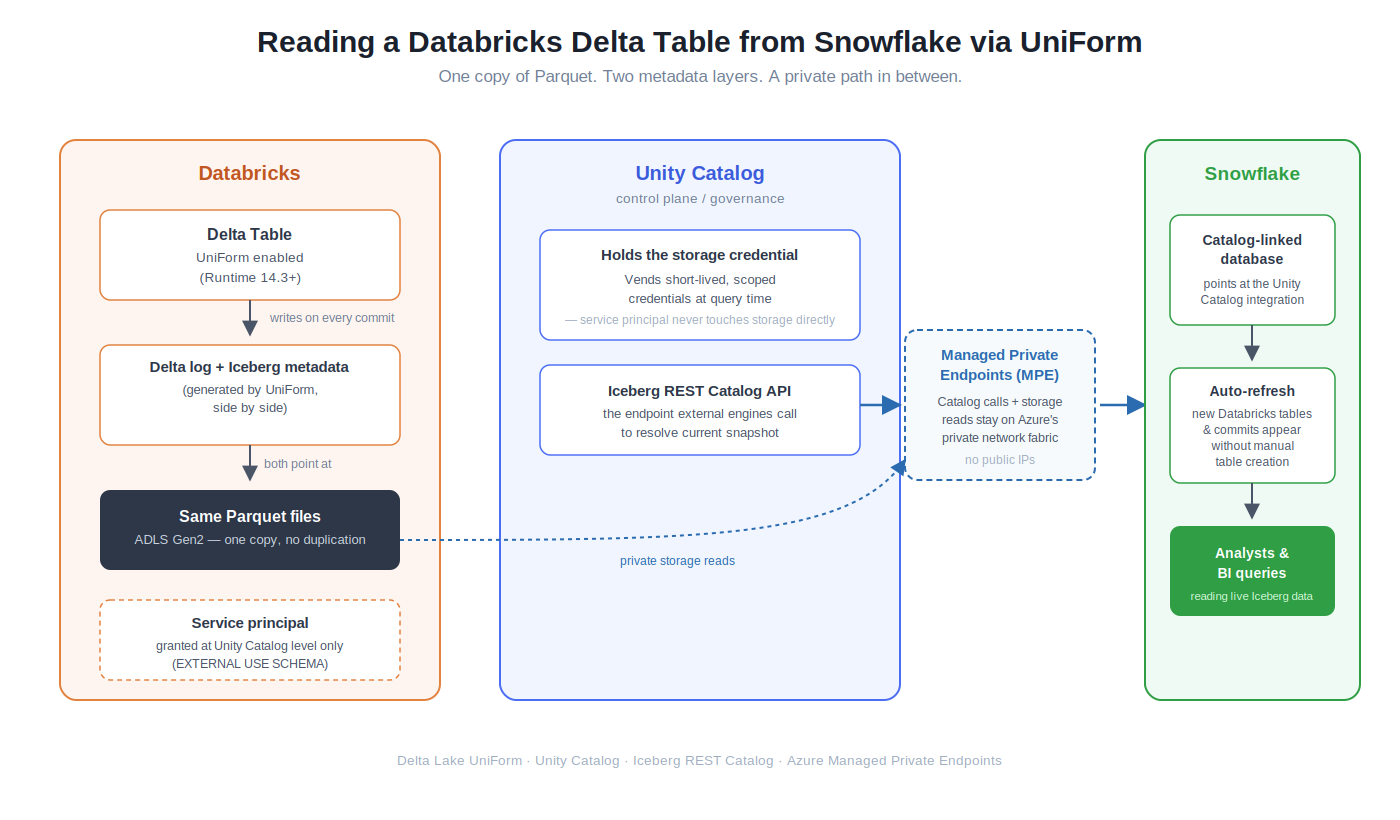
Delta Lake UniForm (Universal Format) is Databricks’ answer to this, and it’s simpler than it sounds: when you write a table as Delta Lake, UniForm generates Iceberg (and optionally Hudi) metadata alongside the Delta log, pointing at the same underlying Parquet files. You don’t end up with multiple copies of the data — you get one copy of Parquet with multiple metadata layers describing it, so any engine that speaks Delta, Iceberg, or Hudi can open the table natively.
That single mechanism is why this matters: Databricks jobs keep writing Delta exactly as before, and Snowflake can read the same table as an Iceberg table — no export step, no second storage bill.
What Setting This Up Actually Looks Like
This was on Azure. Here’s the shape of it, in the order it actually needs to happen:
1. Turn on UniForm at the table. On a Delta table in Databricks (Runtime 14.3 or later), enabling UniForm is a table property — it tells Delta to start writing Iceberg metadata alongside the Delta log on every commit. Same Parquet files underneath, no second copy, just an extra metadata layer.
2. Lock down access with a service principal, not a person. Register a service principal and grant it access at the Unity Catalog level only — including EXTERNAL USE SCHEMA, which is easy to miss because it is not bundled into ALL PRIVILEGES. There’s no need to give it a direct role on the underlying storage account: Unity Catalog holds the storage credential itself and vends short-lived, scoped credentials to the external engine at query time, so the service principal never touches storage permissions directly. Snowflake authenticates to Unity Catalog’s Iceberg REST endpoint as this principal, never as a person, and never with a long-lived shared token in a config file.
3. Keep the traffic off the public internet. In any environment with a real security review, public endpoints for cross-platform catalog and storage access are a non-starter. The practical fix on Azure is Managed Private Endpoints (MPE): both Snowflake’s calls to Unity Catalog’s catalog API and its reads against storage travel over Azure’s private network fabric instead of public IPs. This is usually the step that eats the most calendar time — not because the configuration is technically hard, but because it needs sign-off and coordination across whoever owns networking (VNets, private DNS, endpoint approvals) on both sides of the connection. Budget lead time for that; don’t assume it’s a same-day config change.
4. Link the catalog, don’t hand-build tables. Once the private path is approved and the service principal can authenticate, the last step isn’t creating Iceberg tables in Snowflake one by one — it’s linking Snowflake to Unity Catalog itself, as a catalog-linked database pointed at the catalog integration, with auto-refresh enabled. Whatever exists in Unity Catalog — including UniForm-generated Iceberg metadata for Delta tables — shows up on the Snowflake side automatically, and new tables or schemas created later in Databricks keep appearing without anyone touching Snowflake again. It’s still a metadata pull on a refresh cycle rather than a live push, so know your actual freshness requirements before promising “real-time” off the back of this — but it removes the per-table busywork entirely.
5. Writes are getting real, but check direction and platform. Everything above is Snowflake reading Databricks-written Delta/UniForm tables. Writing back is newer and direction-dependent: Snowflake now supports writing to Databricks-managed Iceberg tables in Unity Catalog (this went GA on Azure earlier this year), and Snowflake Horizon’s side of the federation is genuinely bidirectional — it can both serve its own tables to outside engines and read/write tables owned by external catalogs, using vended, short-lived credentials rather than broad IAM roles.
Unity Catalog’s federation, by contrast, is still primarily inbound: great at letting other engines reach in, more limited when Databricks needs to reach out to an externally-managed catalog. If a design depends on bidirectional writes, verify current support for the specific cloud and catalog combination before committing to an architecture — this is one of the fastest-moving corners of both products right now.
Where It Still Falls Short
This isn’t a solved problem yet. A few rough edges are worth planning around:
Fine-grained governance doesn’t fully travel with the data. Row- and column-level masking is generally available for Spark and is expanding to other Iceberg REST-compatible engines, and Snowflake’s Scan Plan API — which aims to bring cross-engine, attribute-based access control to federated Iceberg data — was still in private preview as of mid-2026. Until that matures, masking and row-security policies may not enforce identically on both sides, so cross-engine governance should be tested, not assumed.
Iceberg’s own spec is moving underneath this. Iceberg v3 features like deletion vectors and row lineage are landing in public preview on Databricks now, which is good for performance and change-data-capture use cases, but it means “Iceberg compatibility” isn’t a fixed target — confirm both platforms support the same table version before standardizing on it.
And disaster-recovery and cross-region replication for federated catalog setups are, as of this writing, still gated or preview-stage on the Unity Catalog side. Anyone leaning on cross-platform interoperability as part of a DR story should not assume it’s covered by default.
The Bigger Shift
None of this makes Snowflake and Databricks interchangeable, and it isn’t supposed to. What it does is move the lock-in question up a layer. Instead of “which warehouse owns my data,” the real question becomes “which catalog is the source of governance truth” — and once that’s answered, compute engines become a far more swappable choice underneath it.
That’s a small technical detail with a large organizational consequence: teams stop needing to win an irreversible platform argument before they’re allowed to use the right tool for a job. Two engines can share one governed set of tables instead of two copies drifting apart.
The advice I’d give anyone evaluating this: pilot it on one real, unglamorous dataset with actual freshness and governance requirements — not a toy table — before redesigning anything around it. The permissions model and the write-direction support are both moving fast enough that anything written here deserves a docs check before being built on.