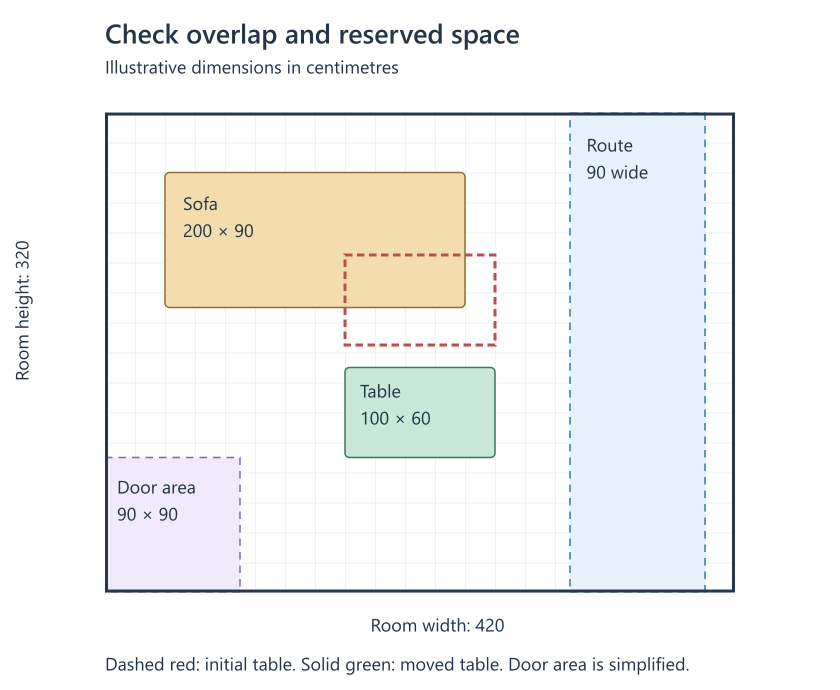
A room sketch can answer a small programming question: do two furniture footprints overlap, and does each footprint stay inside the room? Represent the room and each piece as rectangles, then run those checks whenever a coordinate changes. This gives you a repeatable way to compare a few layouts before ordering. Keep the sketch beside your measurements so that a change in the code can be checked against the room.
Choose one coordinate system
Use centimetres throughout. Put the origin at the upper left corner of the plan, with x increasing to the right and y increasing downwards. Each rectangle has an x coordinate, a y coordinate, a width w and a height h. The coordinates describe its upper left corner. The width and height describe its footprint on the floor.
The example uses a room measuring 420 by 320 centimetres. A sofa occupies a 200 by 90 rectangle at (40, 40). A table initially occupies a 100 by 60 rectangle at (160, 95). These dimensions are invented for the tutorial; they do not describe real products or a measured room. Axis-aligned rectangles keep the arithmetic short. A ninety-degree rotation swaps width and height; other angles require a different geometry test.
Check overlap and room bounds
Two rectangles overlap when their horizontal intervals overlap and their vertical intervals overlap. The strict comparisons below count a shared edge as touching rather than overlap. Touching pieces have no gap between them, so a false overlap result alone says nothing about room to move, clean or open a drawer.
Validate the numbers before comparing them. Number.isFinite rejects non-number values, NaN and infinities without converting strings. Positive widths and heights exclude empty or reversed rectangles. Negative coordinates remain valid inputs to the overlap function, while the room-bounds check rejects a piece placed beyond a wall.
function checkBox(b) {
  if (!b || ![b.x, b.y, b.w, b.h].every(Number.isFinite)
      || b.w <= 0 || b.h <= 0) {
    throw new TypeError('Expected finite coordinates and positive dimensions');
  }
}

function overlaps(a, b) {
  checkBox(a); checkBox(b);
  return a.x < b.x + b.w && a.x + a.w > b.x
    && a.y < b.y + b.h && a.y + a.h > b.y;
}

function inside(box, room) {
  checkBox(box); checkBox(room);
  return box.x >= room.x && box.y >= room.y
    && box.x + box.w <= room.x + room.w
    && box.y + box.h <= room.y + room.h;
}

const room = { x: 0, y: 0, w: 420, h: 320 };
const sofa = { x: 40, y: 40, w: 200, h: 90 };
const table = { x: 160, y: 95, w: 100, h: 60 };
const movedTable = { ...table, y: 170 };
const route = { x: 310, y: 0, w: 90, h: 320 };
console.log(overlaps(sofa, table));       // true
console.log(overlaps(sofa, movedTable));  // false
console.log(inside(movedTable, room));    // true
console.log(overlaps(movedTable, route));// false
The first table position overlaps the sofa. Move the table to y = 170 and the overlap test returns false: the sofa ends at y = 130, leaving a forty-centimetre gap in this model. The table also passes the room-bounds check. Moving its x coordinate to 350 makes its right edge reach 450, beyond the room width of 420, so inside returns false.
Reserve space that furniture should not occupy
Add a rectangle for a route through the room and test every furniture footprint against it. In the drawing, that route starts at x = 310 and has a width of ninety centimetres. This is an illustrative planning choice, not a prescribed clearance or an accessibility standard. The moved table ends at x = 260 and does not overlap the route. A shelf at (300, 20) with a width of forty would overlap it.
Reserve another area near the door. The purple square in the drawing is a simplified keep-clear area measuring ninety by ninety centimetres at (0, 230). A real door rotates through an arc, and its handle, hinges and surrounding furniture need a separate check. Treat these reserved rectangles as visible assumptions. If an assumption changes, edit its dimensions and rerun the comparisons.
Draw the same data in SVG
SVG rectangles use x, y, width and height attributes, so the model maps directly to a drawing. Keep the room coordinates in a nested SVG viewBox and scale the display separately. In the figure, the red outline shows the initial table position; the green rectangle shows the moved position. Labels and colours help explain the two states without changing their dimensions.
For another example of mapping coordinates to SVG rectangles, see How to Create a Simple Object Detector with NextJs. Its drawing uses the same x, y, width and height attributes.

Illustrative dimensions in centimetres. Red outline: initial table. Green: moved table. Blue: reserved route. Purple: door keep-clear area.
Replace the example data with checked measurements
Measure the room, including radiators, projecting skirting and other fixed obstructions. Record the dimensions of the actual pieces you are considering. Record each item’s product-page link beside its measurements so you can return to the same item while comparing layouts. Check each dimension before entering it into the model.
A footprint check cannot tell you whether a piece will pass through an entrance, turn on a staircase or fit inside a lift. Compare the delivery route with the packaged dimensions separately. The model also omits height, sloping ceilings, doors and drawers in motion, and the shape of a person using a chair. Keep those checks alongside the rectangle results and revise the plan when the measured room or a chosen piece differs from the data. For a separate example of representing height in a projected drawing, see Creating Isometric Diagrams with SVG.
References: Number.isFinite() reference; SVG rect reference.
Disclosure: The author works for Dantone Home.