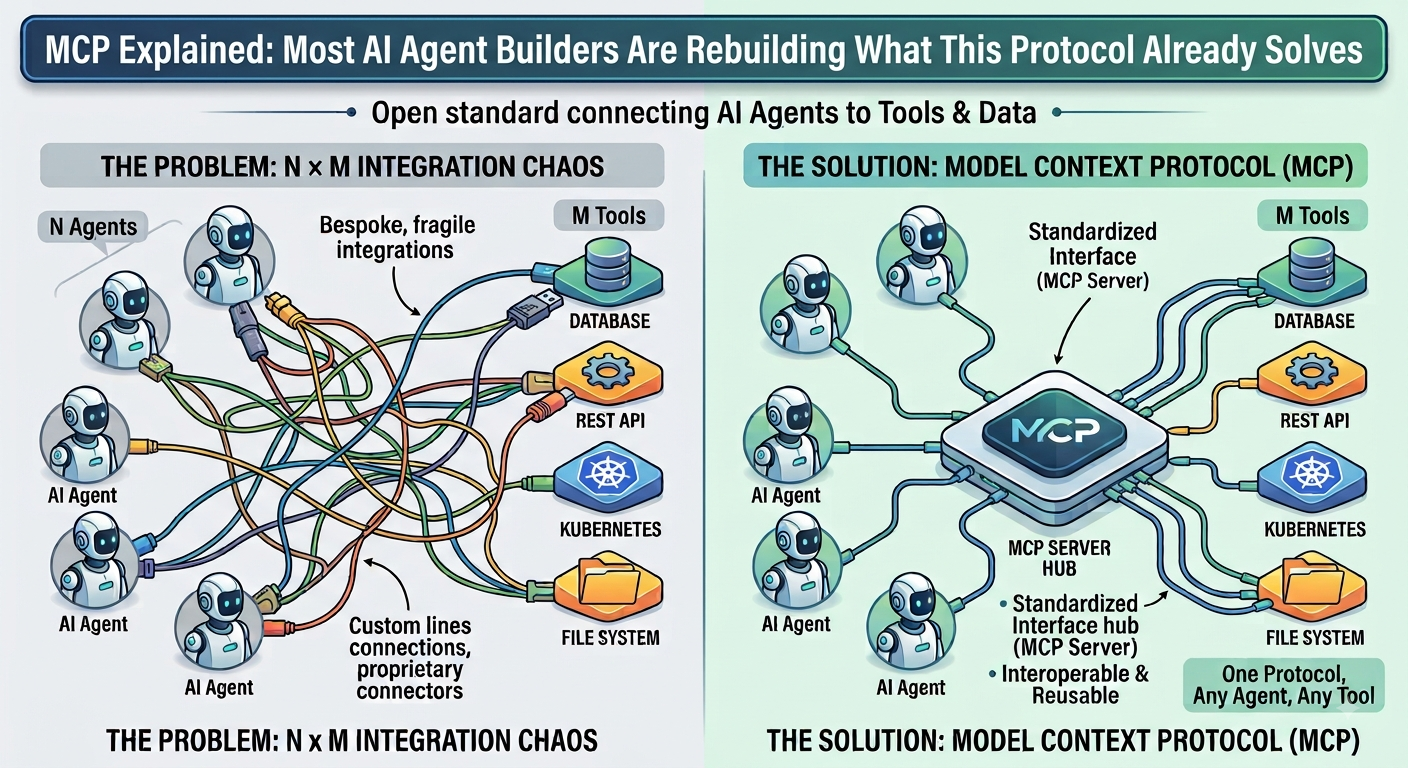
You are building an AI agent. You write a custom wrapper for your database. Then a custom connector for your REST API. Then another for kubectl. Then another for your file system. Each one hand-crafted, fragile, and tied to your specific agent. A colleague builds a different agent and starts from scratch on the same integrations. This is the N x M integration problem, and most AI agent builders are solving it the hard way. MCP already solved it. Here is what it does, how it works, and when you should use it.
The Problem MCP Was Built to Solve
Before MCP existed, connecting an AI agent to external tools was a custom engineering problem every time.
Want your agent to read from a database? Write a custom integration. Want it to call a REST API? Write another custom integration. Want it to read files from Google Drive? Yet another custom integration.
Each integration was proprietary, fragile, and non-transferable. If you switched LLM providers, you rewrote your integrations. If you wanted another agent to use the same tools, you rebuilt the connectors. This is sometimes called the N x M integration problem: N agents each needing custom connectors to M tools means N x M bespoke integrations to build, maintain, and debug.
MCP, Model Context Protocol, was Anthropic’s answer to this. Released in November 2024 and since donated to the Agentic AI Foundation under the Linux Foundation, MCP proposes a single standard interface between AI models and the tools or data sources they need.
One protocol. Any agent. Any tool. That is the promise.
What MCP Actually Is
MCP is an open communication standard — a protocol — that defines how an AI model should request information from, and take actions on, external systems.
Think of it as USB-C for AI agents. Before USB-C, every device needed its own cable. Your laptop charger did not work on your phone. Your phone cable did not work on your camera. The hardware was fine. The connectors were the problem. USB-C did not make devices smarter. It made them interoperable by standardising the connection layer.
MCP does the same thing for AI agents. It does not make your LLM smarter. It makes your agent interoperable by standardising how it connects to tools, data, and services.
The architecture has three components:
MCP Host — the AI application or agent that wants to use external tools. This is your agent, your chatbot, your Claude Desktop, your k8s-ai-agent.
MCP Client — the component inside the host that speaks the MCP protocol. It sends requests and receives responses in the MCP format.
MCP Server — an external service that exposes its capabilities in MCP format. It could be a database, a file system, an API, a Kubernetes cluster, or anything else.
The communication uses JSON-RPC messages. The MCP server advertises its available tools. The MCP client picks a tool and sends a structured request. The server executes and returns a structured response. The agent reasons about the result and decides what to do next.
How MCP Fits Into the Agent Architecture
If you read my previous article on AI agent failures, you will recognise the core agent pattern: LLM plus Tools plus Memory.
MCP does not replace this pattern. It standardises the Tools layer.
Without MCP, your Tools layer looks like this:
    Agent core
        |
    Custom tool 1 (bespoke kubectl wrapper)
    Custom tool 2 (bespoke log reader)
    Custom tool 3 (bespoke API caller)
    Custom tool 4 (bespoke database reader)
Each tool is hand-crafted. Each has its own error handling, authentication, and response format. Each one only works with your specific agent.
With MCP, your Tools layer looks like this:
    Agent core
        |
    MCP Client
        |
    MCP Server 1 (Kubernetes)
    MCP Server 2 (File system)
    MCP Server 3 (REST API)
    MCP Server 4 (Database)
Each MCP server speaks the same protocol. Your agent speaks one protocol. Switch the LLM, keep the servers. Add a new tool, connect a new server. Share your servers with other agents without rewriting anything.
A Real Example: k8s-ai-agent With and Without MCP
I recently built k8s-ai-agent, an open source Python agent that diagnoses Kubernetes issues in plain English. I built it without MCP, using direct subprocess calls to kubectl.
Here is what the kubectl tool looks like without MCP:
def get_pod_details(pod_name: str, namespace: str) -> dict:
    result = subprocess.run(
        ["kubectl", "describe", "pod", pod_name, "-n", namespace],
        capture_output=True, text=True, timeout=30
    )
    return {"success": result.returncode == 0, "output": result.stdout}
It works. The agent uses it to diagnose CrashLoopBackOff pods, read logs, and generate runbooks. For a single-agent project with a fixed set of tools, this is perfectly fine.
Now imagine I want:
– A second agent to use the same Kubernetes tools
– The ability to swap out kubectl for the Kubernetes Python client
– Other developers to plug their agents into my Kubernetes tooling
Without MCP, each of these requires custom integration work. With an MCP server wrapping the Kubernetes tooling, any MCP-compatible agent can connect immediately. No rewriting. No custom connectors. One server, many clients.
That is the real value of MCP: not for the first agent you build, but for the ecosystem you build after it.
The Context Window Problem with MCP
Here is the honest trade-off that most MCP articles skip.
MCP servers advertise all their available tools upfront. A large MCP server with many tools sends all tool descriptions to the agent at startup. Tool descriptions consume tokens. A lot of them.
One critic noted that simply booting up with an MCP-connected agent and saying “Hello” cost 50,000 input tokens. That is before the agent has done anything useful.
This is the same context bloat problem I described in my AI agent failures article. MCP solves the integration problem but can worsen the context window problem if you are not careful.
The solution is the Agent Skills pattern: load only the tools relevant to the current task rather than dumping every available tool into context upfront. MCP and the Skills pattern are complementary — MCP standardises the connection, Skills pattern manages what gets loaded into context and when.
When to Use MCP and When to Build Without It
Here is the practical decision framework:
Reach for MCP when:
- You are building tools that multiple agents will share
- You want your tooling to be reusable across different LLM providers
- You are building in an ecosystem where other MCP servers already exist
- You need standardised discovery: agents finding available tools at runtime
- You are building enterprise tooling where interoperability is a requirement
Build without MCP when:
- You are building a single-purpose agent with a fixed, small tool set
- You need maximum control over tool execution and error handling
- You are prototyping and want to move fast without protocol overhead
- Context window efficiency is a primary concern
- Your tools are highly specialised and unlikely to be reused
MCP vs No MCP: At a Glance
| Without MCP | With MCP | |
|---|---|---|
| Integration effort | Custom per tool per agent | One protocol for all tools |
| Reusability | Zero — tied to your agent | Full — any MCP agent can connect |
| LLM portability | Rewrite integrations on switch | Keep servers, swap the model |
| Context window impact | Controlled, load what you need | Risk of bloat if not managed |
| Setup complexity | Low for single agent | Higher upfront, lower long term |
| Best for | Single-purpose focused agents | Multi-agent shared tool ecosystems |
| Example | k8s-ai-agent, ansible-ai-agent | Enterprise AI platform tooling |
For both projects, k8s-ai-agent which diagnoses Kubernetes cluster issues in plain English, and ansible-ai-agent which generates and executes Ansible playbooks from natural language prompts, I built without MCP because both are focused single-purpose tools with a fixed, known set of operations. The overhead of MCP would not have added value at that scope. But if I were building a shared platform of AI-powered infrastructure tools for a team of engineers to build on top of, MCP would be the right architectural choice.
MCP in 2026: Where It Stands
MCP has moved fast since its November 2024 release.
Anthropic donated it to the Agentic AI Foundation under the Linux Foundation in December 2025, giving it neutral governance. OpenAI, Google DeepMind, and Microsoft have all adopted it. The July 2026 specification introduced stateless scaling, enterprise authorization, and stable SDK betas across Python, TypeScript, Go, and C#.
Gartner projects that by 2026, 75% of API gateway vendors will have MCP features built in. The protocol is on track to become infrastructure the way REST is infrastructure: invisible, assumed, everywhere.
For AI agent builders, this means MCP literacy is no longer optional. You do not need to implement an MCP server today. But you need to understand what it does, how it fits into agent architecture, and when adopting it will save you significant integration work down the line.
Where MCP Fits in the Bigger Picture
If you have read my previous articles, here is how MCP connects to everything else:
Generative AI— the foundational token prediction engine.
RAG — gives agents access to external knowledge using embeddings and semantic search. Passive: retrieves and generates, does not act.
AI Agents — adds tools and memory to the LLM loop. Active: reasons and acts.
MCP — standardises how agents connect to tools. The interoperability layer that makes the Tools component of the agent composable and reusable.
Agentic AI — coordinates multiple agents through an orchestrator. MCP makes it possible for agents in an Agentic AI system to share tools without custom integrations between each pair.
Agent Skills — manages context efficiency by loading only relevant instructions on demand. Works alongside MCP to prevent context bloat as tool libraries grow.
Each layer solves a different problem. MCP specifically solves the integration problem — and it solves it at the right layer.
Key Takeaways
– MCP is an open protocol that standardises how AI agents connect to external tools and data sources, solving the N x M integration problem
– Think of it as USB-C for AI agents: one standard connection interface that works across models, tools, and providers
– MCP consists of three components: the host (your agent), the client (the protocol handler), and the server (the external tool or data source)
– MCP solves the integration problem but can worsen the context window problem if all tools are loaded upfront. Use the Agent Skills pattern alongside MCP to manage context efficiently
– Build without MCP for single-purpose agents with fixed tool sets. Adopt MCP when building tools that multiple agents will share or when interoperability across LLM providers is a requirement
– MCP is now governed by the Linux Foundation and adopted by all major LLM providers. It is on track to become infrastructure-level standard for AI agent tooling