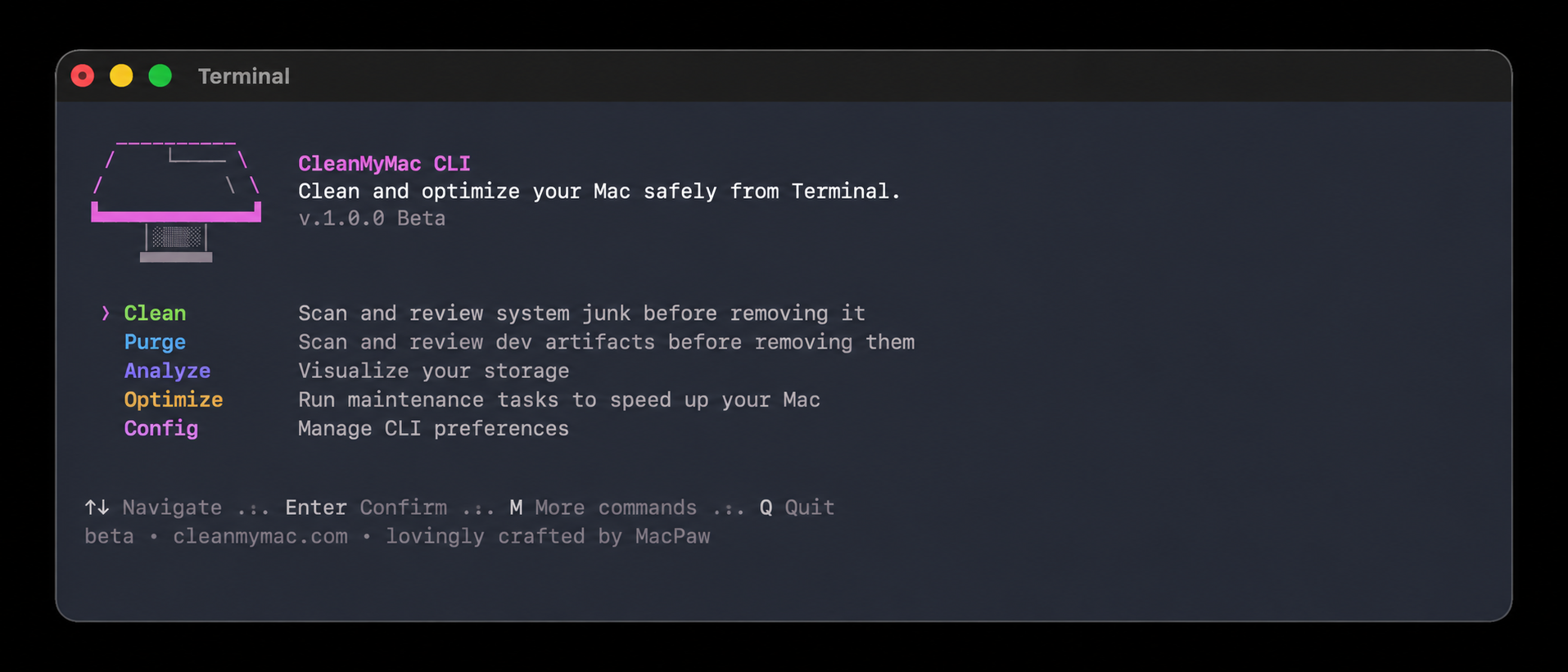
Most development work happens in the Terminal. Projects get built there, logs get checked, and scripts get run. The same environment also fills up over time with things that are easy to forget about: package-manager caches, old build artifacts, Docker layers, Xcode leftovers, and the general debris of everyday work. Clearing it out has usually meant switching to a separate application, which breaks whatever was in progress.
CleanMyMac now has a command-line version that runs entirely in the Terminal — еhe goal was to clear developer clutter in the same place developers already work.
What CleanMyMac CLI is
For most of its history, CleanMyMac has been a graphical Mac app: users open a window, run a scan, and review the results by clicking through them. A command-line interface, or CLI, does the same kind of work through typed commands instead of a graphical window. CleanMyMac CLI reuses the cleanup logic from the desktop app and exposes it as a set of commands that run in any shell.
The tool is organized around four areas of work: cleaning caches and system junk, purging old project artifacts, analyzing disk usage, and running quick optimization tasks. Each of these maps to a single command, and every command shows what it found before anything is removed.
Why the team built it
The reason for building it came from inside the team. The people who work on CleanMyMac are developers, and they spend their days in the Terminal like everyone else who ships software. Opening a graphical app to clear a few gigabytes of Docker images or an old node_modules folder meant leaving that environment and losing focus.
Installing CleanMyMac CLI
The tool requires macOS 11 (Big Sur) or later and Homebrew, the package manager many Mac developers already use. Installation goes through a Homebrew tap:
brew install --cask macpaw/taps/cleanmymac-cli
After installation, cleanmymac --version confirms the build, and running cleanmymac on its own opens an interactive menu. The commands also work directly, which is what makes the tool usable inside scripts. (cmm is a shorter alias for the same tool.)
What the commands do
clean handles the leftovers that pile up outside individual projects. Run on its own, it covers three categories at once: developer-tool caches, system junk, and trash.
cleanmymac clean
Individual categories can be run separately. cleanmymac clean dev clears cached packages and build files left by developer tools such as Homebrew, npm, Yarn, pnpm, pip, Cargo, Docker, VS Code, JetBrains, and Xcode, among others. cleanmymac clean junk targets system-level developer junk like user logs and Xcode DerivedData. cleanmymac clean ai looks for artifacts left by AI tools, and cleanmymac clean trash empties the trash bins.
purge deals with the generated files that live inside project folders, such as node_modules, virtual environments, and build directories.
cleanmymac purge
It scans common developer locations (~/Projects, ~/Code, ~/dev, ~/GitHub, ~/Workspace) and groups what it finds by project, so each artifact is tied to something recognizable. Artifacts older than seven days are preselected, while more recent ones are shown but left unchecked, which reduces the chance of removing files from active work. A single folder can be scanned with cleanmymac purge <path>.
analyze opens an interactive view of where storage has gone, sorted by size, with the option to reveal any item in Finder. Browsing through it does not change anything on disk, and removal always requires a deliberate selection.
cleanmymac analyze
optimize runs lightweight maintenance. cleanmymac optimize ram releases inactive memory, which can help before a heavy build, and cleanmymac optimize purgeable asks macOS to free disk space it has marked as purgeable but not yet released. Neither command touches project source code or personal files.
How removal is handled
The tool is built around a review step. A typical run scans first, then presents what it found grouped by category or project, and waits for confirmation before deleting anything. The default answer to that confirmation is always no, so nothing is removed by simply pressing return.
Several rules exist to reduce the risk of an accidental deletion. Critical system locations are visible for context but locked, so they cannot be selected. Any path can be added to an ignore list so that it never appears in future scans:
cleanmymac ignore add ~/Projects/important-project
There is also a --force flag that skips the confirmation prompt for supported commands. It exists for scripted use, and the recommendation is to run a command without it first and review the results before relying on it.
On privacy, the tool does not upload source code or personal files, and analytics can be turned off in cleanmymac config.
Closed source and free alternatives
Two points about CleanMyMac CLI tend to come up quickly in developer discussions, so they are worth addressing directly.
The first is that the tool is closed source. CleanMyMac CLI is proprietary software owned by MacPaw. The reason is that the scanning and cleanup logic is the core of the product, refined over more than a decade of building Mac cleanup software, and that logic is what determines which files are safe to remove and which are not. Free and open-source cleanup tools are useful, and there is no argument against them here. The difference on offer is a maintained tool backed by a team that runs it on their own machines every day, with support and accountability if something goes wrong, rather than a script that has to be audited before it can be trusted on a work machine.
Why this matters for Mac users
For people who write software, storage pressure tends to be a recurring condition rather than a one-time cleanup. Development tools generate cache and build data continuously, and a large share of it is safe to remove once a task is finished. The useful part of a tool like this is less about freeing space once and more about making cleanup routine and reviewable, so that files are removed on purpose rather than through a broad manual command that is easy to get wrong.
Keeping the process inside the Terminal matters for a similar reason. Cleanup that fits into an existing workflow is more likely to actually happen, and a step that shows what will be removed before removing it lowers the risk of deleting something that was still needed. CleanMyMac CLI is focused on terminal-first developer cleanup and is not meant to replace CleanMyMac, the all-in-one Mac care app in the MacPaw ecosystem that handles system maintenance across junk, duplicates, malware, and performance.
Try it and share feedback
It installs through Homebrew:
brew install --cask macpaw/taps/cleanmymac-cli
Bug reports, feature requests, and notes about commands that are missing or behaving unexpectedly are all welcome. The GitHub repository has the full command list, documentation, and issue tracker, and the comments on this article are read by the team.
Sources and links
- CleanMyMac CLI on GitHub: https://github.com/MacPaw/cleanmymac-cli
- Original announcement on the MacPaw blog: https://macpaw.com/news/cleanmymac-cli
- Documentation and command reference (GitHub Wiki): https://github.com/MacPaw/cleanmymac-cli/wiki